• ✨ ARCHIVE MODE ✨
    The forum has now been set to read-only mode, no new posts, resources, replies etc will not be possible.
    We recommend you join our Discord server to get real-time response: Discord Invite Link

Missing Content Squad

Status
Not open for further replies.

DracoHouston

Kolben Developer
Contributor
How i go about fixing this any idea?
I would imagine making the individual .png smaller while keeping the same dimensions before compiling it into the sprite sheet this should i think fix the problem however i do not know how this will look in-game.
strange. nilllzz told me how it works and it like looks at every frame and finds the biggest then uses that as the default size for all frames, then it fills in missing bits if the gif frames were optimized. perhaps lugia is just too dang big? the gif itself could be resized a bit maybe? there could be an upper limit on how big the frames are in the sprite merger. (any ideas nilllzz?)

that size problem is something we can't fix ourselves but its a problem nilllzz will have to deal with. any of them that don't work can be replaced later, the others that work will be a lot of help and the ones that don't will identify gaps in his pokemon system

thank you again for doing this stuff
 

DracoHouston

Kolben Developer
Contributor
it might also be possible to just remove some frames but it might be too much of a PITA to do, i'm sure nilllzz can split the big ones up.

i'd have a variable in the pokemon class storing if the pokemon has 1-n sprite sheets, with first sheet being Front0.xnb etc then Front1.xnb and so on
 

nilllzz

Original Developer
Administrator
P3D Developer
Yeah I had this problem once with Blastoise. Just leave out the last few animations.
 

DracoHouston

Kolben Developer
Contributor
Yeah I had this problem once with Blastoise. Just leave out the last few animations.
any idea about the overlapping wings on lugia? in theory they should all be spaced far enough apart to allow the full wing span but its not doing it for splint for some reason
 

DracoHouston

Kolben Developer
Contributor
for the wing thing i'd probably just try resizing the gif before you rip the frames from them, because pokemon also have a scale that should make the pokemon bigger or smaller in the game, lugia could just have a slightly higher scale than it would have to compensate for smaller sprites
 

nilllzz

Original Developer
Administrator
P3D Developer
for the wing thing i'd probably just try resizing the gif before you rip the frames from them, because pokemon also have a scale that should make the pokemon bigger or smaller in the game, lugia could just have a slightly higher scale than it would have to compensate for smaller sprites
Very good idea. Just extract the frames and resize them. I think there is a tool for that.
 

DracoHouston

Kolben Developer
Contributor
Very good idea. Just extract the frames and resize them. I think there is a tool for that.
if you 'resize image' in GIMP on an animated gif it resizes everything for you, and the interpolation or w/e the settings called can be set to none to preserve all the pixelness instead of making it blurred. that way you don't have to resize every frame png its how i resize gifs vdub makes out of fraps footage like this
 

nilllzz

Original Developer
Administrator
P3D Developer
If that works, it's fine ;)
I wasn't sure if GIMP can actually resize all the layers of an animation at once.
 

Splint

Champion
Thanks for the replies guys i tried editing Lugia using gimp.

At first i tried re-sizing the canvas to have a bigger width however that had no effect because like u said the program looks for the biggest size.

I then tried to scale the image down that worked however i ended up with these:
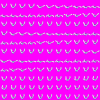
Back.png Back_s.png Front.png Front_s.png

The back images are scaled a bit less then the front since the back images had no problems with overlapping.
However the front images are a problem when scaling down the image it creates edges for some reason and i have to scale it down a bit further then the back images to avoid overlaps.

I could edit these manually and remove the edges that is not a big of a deal however the quality of the images are rather poor compared to the original quality which was crisp and sharp.

Besides that i finished converting Gen 2 , Gen 3 , Gen 4 and Gen 5 to xnb and sprite sheets.
I uploaded the xnb and sprite sheet files to dropbox.

Link: https://www.dropbox.com/sh/0hhtp9hvkwys5qq/6qw_qPhbyK

I have however not yet checked the other images to see if there are more overlapping my guess is a couple more Pokémon will have this problem.

Question:
For the dimension problem if i were to remove the last couple of frames of the animation wouldn't that cut the animation at the end making the looping look rather awe full?

Suggestion / Request:
Also a suggestion if i may is there a possibility to have some sort of previewer available for textures and sprites this would make reviewing how it looks in game a whole lot easier i would create one myself if i knew how to properly display them however i have no prior experience programming in XNA just basic C# in visual studio.

A bare bone version of the game with just options to use arrows keys to go trough the loaded textures and sprites would be enough i think.

Edit:
Thinking about it a bit more would a dummy map with pre placed entities / npc / blocks be a easier solution?

Convert Notes:
These pokémon threw up errors while compiling due to a too big of a dimension i re-sized these to 2048 so expect them to be bit of lesser quality.

Generation 3:
  • Seedot
  • Meditite
Generation 5:
  • Kyurem (White form)
  • Landorus (Therian form)
  • Meloetta
  • Oshawott
  • Tornadus (Therian form)
 

DracoHouston

Kolben Developer
Contributor
i wouldnt worry about back and front sprites mismatching size too much, what would be bad is frames with different scales in the same animation.
 

DracoHouston

Kolben Developer
Contributor
different sized sprites won't matter, what would be bad is different sizes within the same animation. i barely notice any difference looking at the two
Suggestion / Request:
Also a suggestion if i may is there a possibility to have some sort of previewer available for textures and sprites this would make reviewing how it looks in game a whole lot easier i would create one myself if i knew how to properly display them however i have no prior experience programming in XNA just basic C# in visual studio.

A bare bone version of the game with just options to use arrows keys to go trough the loaded textures and sprites would be enough i think.
repost from another thread butthats literally what the draco has cookin'
 

DracoHouston

Kolben Developer
Contributor
Awesome guess i will wait it out before throwing in more suggestions :p
good to know its something someone would use though. i've been musing on releasing it quietly (the binary, not the source, that is not mine to give) but i'm going to double check with nilllzz if thats cool.

the editor exe can just be dropped into the pokemon folder next to pokemon.exe, theres some textures for the buttons , and a map for use as a new map template (its just a 20x20 grass floor), its pretty much the same engine as the game and uses the same content files
 

DracoHouston

Kolben Developer
Contributor
thinking about it more, you'd be wanting to review your pokemon sprites, right? once this thing can make maps and all that if nilllzz lets me have a go at making pokemon themselves moddable the editor will be a good place to have a lot of the tools for that. eventually an xnb converter like xnaformatter but all intergrated into the content browser window for importing textures would be hell of sick. i'd love to see how moves are animated, if it were possible to edit particle systems for it within the content browser and editor that would be even sicker. your one stop modding shop.

keep in mind that this is just me thinking out loud, lets get it actually making maps first lol
 
Status
Not open for further replies.
Top