
-
✨ ARCHIVE MODE ✨
The forum has now been set to read-only mode, no new posts, resources, replies etc will not be possible.
We recommend you join our Discord server to get real-time response: Discord Invite Link
Spritework help
- Thread starter Danieru
- Start date
- Status
- Not open for further replies.

Splint
Champion
As of right now there are no spritesheet templates available.
But with the current tools available for extracting current textures and repacking them to XNB it should be enough to find out what dimensions u need to have for each sprite / spritesheet.
However if u think we need templates and if you are up for it then by all means u could make them if u want.
But with the current tools available for extracting current textures and repacking them to XNB it should be enough to find out what dimensions u need to have for each sprite / spritesheet.
However if u think we need templates and if you are up for it then by all means u could make them if u want.

Danieru
Trainer
Okay, basicaly, i just wanna create my own fakemon, and i wanna discover an easy way to make the animation look smooth. Making a template spritesheet would be an easy way to create each sprite/frame of the animation.
I want someone to tell me, for each sprite.. what is formula (in pixels) I need to go with. (Pixel x Pixel)
I want someone to tell me, for each sprite.. what is formula (in pixels) I need to go with. (Pixel x Pixel)
Splint
Champion
Ok judging by the dimension of the spritesheet of lugia the entire spritesheet is 1408x1408 with 11 sprites on a row so 1408 / 11 = 128 so each individual sprite has to be max 128 x 128
And try to prevent this from happening if you're going for really big fakemon
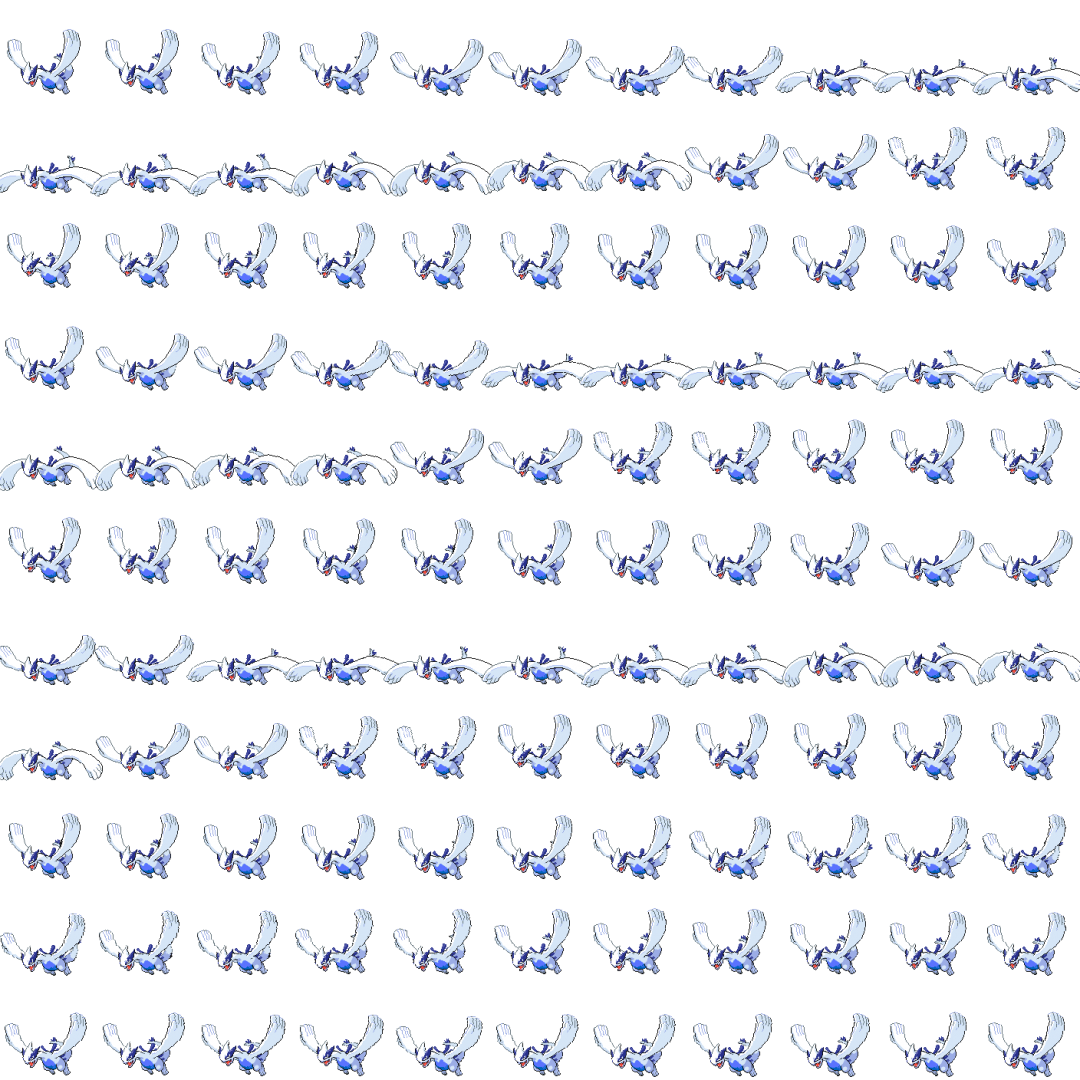
A couple of pokemon have had this problem during the converting of the sprite they still need to be fixed but i did not have the time to go trough them one by one lugia was just one of pokemon i came across that had this issue.
And try to prevent this from happening if you're going for really big fakemon
A couple of pokemon have had this problem during the converting of the sprite they still need to be fixed but i did not have the time to go trough them one by one lugia was just one of pokemon i came across that had this issue.
Danieru
Trainer
OMG, i cant believ how STUPID i am xD
All i had to do is, go to the program (Paint.net) im editing the sprites with, Check the canvas size (1280x1280), devide by the amount of sprites on the sheet (100) and then *POOOOF* i got my answer. Each sprite size is 128x128, and that is the space i can work with
All i had to do is, go to the program (Paint.net) im editing the sprites with, Check the canvas size (1280x1280), devide by the amount of sprites on the sheet (100) and then *POOOOF* i got my answer. Each sprite size is 128x128, and that is the space i can work with
- Status
- Not open for further replies.