• ✨ ARCHIVE MODE ✨
    The forum has now been set to read-only mode, no new posts, resources, replies etc will not be possible.
    We recommend you join our Discord server to get real-time response: Discord Invite Link

Missing Content Squad

Status
Not open for further replies.

Ppprre

Pokémon Ranger
i will not be working on sprites and maps at all for a little while, because i have to work on the editor, but hopefully that helps you guys get the whole work flow set up

the create folder button in the 2nd program makes the Front Back etc folders for you, you have to make the one for your pokemon's name though
When I used the create folder it asked me to name the Pokemon, so I typed in Spearow. Then there was a folder called Spearow in the folder I created called Spearow. I will keep going and see if I can make these properly anyway. Would you like me to post the ones I do here, if they are done correctly?
 

DracoHouston

Kolben Developer
Contributor
When I used the create folder it asked me to name the Pokemon, so I typed in Spearow. Then there was a folder called Spearow in the folder I created called Spearow. I will keep going and see if I can make these properly anyway. Would you like me to post the ones I do here, if they are done correctly?
Of course :) If you have any issues let me know. For now you can probably test if they work by compiling the xnbs into another pokemon's folder instead of their own (again' i'd do all this stuff in a backup copy of the game, not the one you use to play) and see if you can make charmander look like spearow or whatever. if they work its probably safe to say your prite sheets work :)

Does everyone have hosting for this stuff? I guess if all else fails you can zip them up and stick them on one of those file mirroring sites, or maybe put them in the public part of your dropbox if you got one
 

Ppprre

Pokémon Ranger
I have it done in a spare Animations folder, only 3 though, need to know if I'm doing them right before I do more.
How do I compile them into Xnb?

BTW is there supposed to be 4 PNGs in the Pokemonname folder? (With the folders for back, front, shiny)
 

Splint

Champion
Can u explain your file / folder structure a bit more clear Ppprre? I am currently in the works of converting the Gen 2 Sprites obtained from here http://sprites.pokecheck.org/?gen=2 (Just save the html page and u will save the entire collection of .gif and .png with it)

the .gif needs to be in the correct folder i.e back in the back folder etc then added trough the GIFMaker GUI
when all 4 are added u then end up with this
Chikorita Back.png
Once u have that u need to follow the next step for the PokemonSpriteCreator which will give u this
Chikorita.png
Once u have this u can convert these to XNB using XNABuilder (XNAformatter)

Edit:
U will need this program to convert to xnb http://sourceforge.net/projects/xnbbuilder/
See next post for the requirements and download links in order to run the tool

 

DracoHouston

Kolben Developer
Contributor
yeah use xna formatter, making sure to output it to the intended folder (i think it doesnt like things being in the wrong folder relative to the game's exe). use reach target profile, compress output. all other settings are fine. you give it your pngs and it will give you an xnb with the same name as your png in the output folder you set. if people are still having problems there may be something in this: http://pokemon3d.net/forum/threads/60/ otherwise ask here and we'll get you sorted.

there's 4 folders (eventually turning into 4 xnbs) because the game needs the idle animation for pokemon from the front, back and front if theyre shiny and back if theyre shiny. each are just made out of gifs from pokewiki.de like this
http://www.pokewiki.de/Mauzi#Sprites_und_Artworks the ones everyones using are black and white 2, the animated ones.

page names on that wiki are in german, this is the pokedex with links to each pokemon http://www.pokewiki.de/Pokémon-Liste
 

DracoHouston

Kolben Developer
Contributor
there's no support for genders yet so just use whichever gender's sprite you like more i guess when there's male and female versions (like pikachu)
 

Splint

Champion
Is there a general place where we can upload the finished files to and a place where we can check what has been finished?

As of now it is hard to figure out what has and has not been converted yet.
 

DracoHouston

Kolben Developer
Contributor
Is there a general place where we can upload the finished files to and a place where we can check what has been finished?

As of now it is hard to figure out what has and has not been converted yet.
right now that is this thread, unfortunately. you can use @ tagging in this forum like twitter to make the post show up in nilllzz' alerts. i guess theres free mirroring sites if you need to upload something. i just use a 3 dollar a month shared hosting account i have. you could also use drop box

there is a wiki being worked on so this sort of collaborative effort can be all on 1 page with no chatting in between once thats ready for the public
 

DracoHouston

Kolben Developer
Contributor
all i know thats been done is what ive done
-sprout tower
-tile sets for what should be all johto gym/building areas are in the OP, compiled.
-21-151 have skeleton files from pokemoncreator, they are NOT all sprited up. I have no idea who is doing what.
-NPCs for 1st and 2nd Gym and Sprout Tower.

everyone who is doing stuff feel free to spam up this thread, when you are working on things post here with what you're doing, and when you're done edit the post/make a new post with the results, tag the post for nilllzz so he sees it. once the wiki is up this thread can just be for chatting about what you're doing at the time and less about what you have done (they can all go on 1 wiki article with links and descriptions etc that everyone has access to)
 

Splint

Champion
Whipped up a program in java to create the folder structure of the animations copy pasting the folders by hand got a bit tedious hopefully this speeds up the progress a bit.

I would automate the entire process if i could however i do not have the knowledge to create such a program guess this will have todo :p

Embedded to this post should be the program i included the source code incase u want to check it for whatever reason.

Instructions: (Outdated v0.2 is down below however v0.1 can still be used for just creating folders)
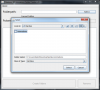
  • Opening the program will give u something like this
1.png
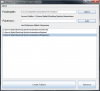
  • Next Select the directory u want to create your pokemon folders in.
2.png
  • Next add the pokemon to the list u want to create the folders for
3.png
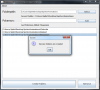
  • Hit Create Folders and u will get a prompt if the folders have been created
4.png
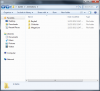
  • Now go to your directory u selected earlier and your folders should be in there
5.png
  • Inside should be the 4 folders needed for converting the .gif
6.png
 

Attachments

Splint

Champion
Just checked the tool and apparently it does didn't even notice it until now however it does require you to go trough a couple of steps of clicking creating the folders one by one where as this program uses a list and creates the folders after u added the pokemon to the list guess it saves some time oh well serves me for not paying more attention :p
 

Ppprre

Pokémon Ranger
Can u explain your file / folder structure a bit more clear Ppprre? I am currently in the works of converting the Gen 2 Sprites obtained from here http://sprites.pokecheck.org/?gen=2 (Just save the html page and u will save the entire collection of .gif and .png with it)

the .gif needs to be in the correct folder i.e back in the back folder etc then added trough the GIFMaker GUI
when all 4 are added u then end up with this
View attachment 73
Once u have that u need to follow the next step for the PokemonSpriteCreator which will give u this
View attachment 72
Once u have this u can convert these to XNB using XNABuilder (XNAformatter)

Edit:
U will need this program to convert to xnb http://sourceforge.net/projects/xnbbuilder/
See next post for the requirements and download links in order to run the tool
The 2nd picture is what I have, so I think I'm doing it right.
Do I have to compile them into XNBs or can I just create the folders up until that point because I would prefer not to have to download more programs to do this.
 
Status
Not open for further replies.
Top