
-
✨ ARCHIVE MODE ✨
The forum has now been set to read-only mode, no new posts, resources, replies etc will not be possible.
We recommend you join our Discord server to get real-time response: Discord Invite Link
Green light for personalized skins?
- Thread starter xxaa
- Start date
- Status
- Not open for further replies.


Splint
Champion
You can have your own skins in the game if u want to all u need is to create a new npc skin and edit your player.dat file and change the line of code that saids what skin u have.
If u want to use the skin in a co-op game your partner will need to have that skin as well in his content folders.
Let me look up one of the threads where it saids how to edit the skins.
If u want to use the skin in a co-op game your partner will need to have that skin as well in his content folders.
Let me look up one of the threads where it saids how to edit the skins.

Splint
Champion
From the thread http://pokemon3d.net/forum/threads/29/page-3#post-5769Step 1:I'd love it if there was a coherent tutorial for putting custom Trainer sprites in the game, since I have the spriting knowledge to make them, buuut I lack the technical knowhow to do so. ^^;
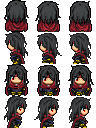
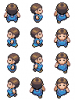
Trainer sprites sheets are 96 x 128 so 32 pixels big per sprite and will look like this
View attachment 115
U can edit this one if u want and save it.
Step 2:
To convert the sprite to a usable format for the game u can use a program called XNA Formatter this will convert it to xnb
Available from here:
http://sourceforge.net/projects/xnbbuilder/
Step 3:
Name your file to something u like and place it in the following folder:
Pokemon3D\Pokemon\Content\Textures\NPC\
Step 4:
Go to your save folder located at Pokemon3D\Pokemon\Save\<Your Ingame Name>
open up the file named Player.dat in notepad or wordpad or any text editing program.
Inside it will look something like this
The part we are interested in is thisCode:Name|Test Position|2,0.1,2 MapFile|yourroom.dat Rotation|4.767895 RivalName|??? Money|3000 Badges|0 Gender|Male PlayTime|0,2,55 OT|18147 Points|0 hasPokedex|0 freeCamera|1 thirdPerson|0 skin|Red location|Your Room battleAnimations|1 BoxAmount|5 LastRestPlace|yourroom.dat LastRestPlacePosition|1,0.1,3 DiagonalMovement|0 RepelSteps|0 LastSavePlace|barktown0.dat LastSavePlacePosition|8,0.09602252,-1
All you need to do is replace "Red" with the name u have given to your xnb file.Code:skin|Red
Save it and you are done.
Note:
If u tend on using this on multiplayer the person whom you are playing co-op with needs to have this file as well before connecting to your session.


Splint
Champion
Here u go
Attachments
-
20.4 KB Views: 329
Splint
Champion
Edited the file and converted it for u give it a go
 became
Attachments
-
3.6 KB Views: 327


- Status
- Not open for further replies.