

Delvan
Starting Trainer
On my laptop, I am no longer able to launch the game. I generally play on my desktop, last played on my laptop in 50.1. Today I updated to the newest version, and get the below error message when I attempt to start the game.
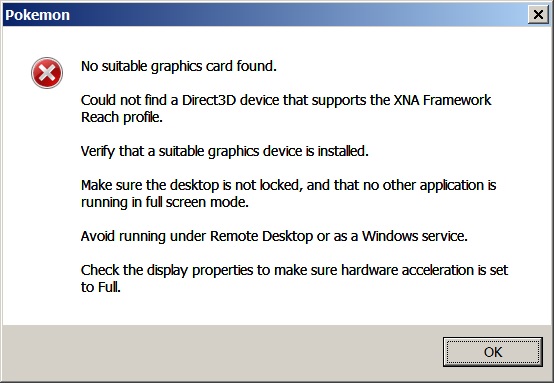
I reverted to the previous version, and experienced the same error.
My best guess on the source of this bug is that the last time I played, I had a second monitor attached, and was using the game on that monitor. Now I am overseas with no extra display devices. Perhaps the game doesn't check whether the display it last used is no longer present on the system? I'm still using the same video cards (ATI Mobility RAdeon HD 3870 x2) and haven't updated the drivers for them during the interim, desktop isn't locked, nothing running in fullscreen, not using Remote Desktop, not trying to run the game as a service, hardware acceleration on.
What I expected to happen:,
The game to launch on the same (and only) display that the launcher window was present on
What actually happened:
Error window, see above.
Steps to reproduce:
If my guess is right (I can't confirm this will reproduce the issue):
1) Play on a multi-monitor machine, with the game running on the secondary display device
2) Save, exit, then remove the extra displays from the system
3) Start launcher and attempt to launch the game
(Add a crash log here if available and enclose it in the code tag with this button:
 )
)
I reverted to the previous version, and experienced the same error.
My best guess on the source of this bug is that the last time I played, I had a second monitor attached, and was using the game on that monitor. Now I am overseas with no extra display devices. Perhaps the game doesn't check whether the display it last used is no longer present on the system? I'm still using the same video cards (ATI Mobility RAdeon HD 3870 x2) and haven't updated the drivers for them during the interim, desktop isn't locked, nothing running in fullscreen, not using Remote Desktop, not trying to run the game as a service, hardware acceleration on.
What I expected to happen:,
The game to launch on the same (and only) display that the launcher window was present on
What actually happened:
Error window, see above.
Steps to reproduce:
If my guess is right (I can't confirm this will reproduce the issue):
1) Play on a multi-monitor machine, with the game running on the secondary display device
2) Save, exit, then remove the extra displays from the system
3) Start launcher and attempt to launch the game
(Add a crash log here if available and enclose it in the code tag with this button:
