• ✨ ARCHIVE MODE ✨
    The forum has now been set to read-only mode, no new posts, resources, replies etc will not be possible.
    We recommend you join our Discord server to get real-time response: Discord Invite Link

Crash [Indev 0.50.1] Logless Crash

nilllzz

Original Developer
Administrator
P3D Developer
You could also try the following method to start only few components of the game:
Press Windows + R and type cmd and press enter to open the console.
In the console, type the following:
Code:
cd "C:\Users\<username>\Desktop\Pokemon\Pokemon\"
and press Enter. I am assuming you put the "Pokemon" folder on your Desktop (from your screenshots) and you have to replace <username> with your Windows username.
Then, in the same console window, type this:
Code:
Pokemon.exe "MAP:barktown.dat"
This should open a Pokémon3D game in the Map View mode.
 

Scruffy3Janitor

Pokémon Ranger
dude from my launcher, as i just chatted you you have the id.dat and launcher_settings.dat in the wrong spot, they are in the SECOND pokemon folder
 

nilllzz

Original Developer
Administrator
P3D Developer
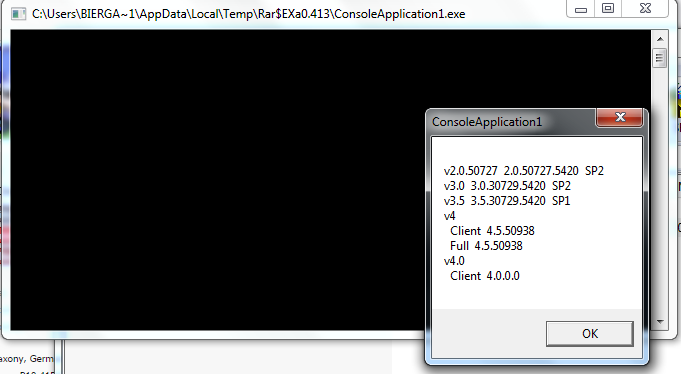
Btw, source code for those who are interested:
Code:
Module Module1

  Sub Main()
  MsgBox(GetInstalled())
  End Sub

  Public Function GetInstalled() As String
  Dim output As String = ""

  Try
  Using ndpKey As Microsoft.Win32.RegistryKey = Microsoft.Win32.RegistryKey.OpenBaseKey(Microsoft.Win32.RegistryHive.LocalMachine, Microsoft.Win32.RegistryView.Registry32).OpenSubKey("SOFTWARE\Microsoft\NET Framework Setup\NDP\")
  For Each versionKeyName As String In ndpKey.GetSubKeyNames()
  If versionKeyName.StartsWith("v") Then
  Dim versionKey As Microsoft.Win32.RegistryKey = ndpKey.OpenSubKey(versionKeyName)
  Dim name As String = DirectCast(versionKey.GetValue("Version", ""), String)
  Dim sp As String = versionKey.GetValue("SP", "").ToString()
  Dim install As String = versionKey.GetValue("Install", "").ToString()
  If install = "" Then
  'no install info, ust be later
  output &= versionKeyName & "  " & name & vbNewLine
  Else
  If sp <> "" AndAlso install = "1" Then
  output &= versionKeyName & "  " & name & "  SP" & sp & vbNewLine
  End If
  End If
  If name <> "" Then
  Continue For
  End If
  For Each subKeyName As String In versionKey.GetSubKeyNames()
  Dim subKey As Microsoft.Win32.RegistryKey = versionKey.OpenSubKey(subKeyName)
  name = DirectCast(subKey.GetValue("Version", ""), String)
  If name <> "" Then
  sp = subKey.GetValue("SP", "").ToString()
  End If
  install = subKey.GetValue("Install", "").ToString()
  If install = "" Then
  'no install info, ust be later
  output &= versionKeyName & "  " & name & vbNewLine
  Else
  If sp <> "" AndAlso install = "1" Then
  output &= "  " & subKeyName & "  " & name & "  SP" & sp & vbNewLine
  ElseIf install = "1" Then
  output &= "  " & subKeyName & "  " & name & vbNewLine
  End If
  End If
  Next
  End If
  Next
  End Using
  Catch ex As Exception
  output &= "Error getting .Net installation information."
  End Try

  Return output
  End Function

End Module
 

BierGarten100

Starting Trainer
gg ... i have deinstall the .NET Framework and would install white the Full_Setup but he say me this:
"
Details

Dieselbe oder eine höhere Version der .NET Framework 4.5 wurde bereits auf diesem Computer installiert.
"
jea \(o.o)/ i can distroy my computer xD
 

BierGarten100

Starting Trainer
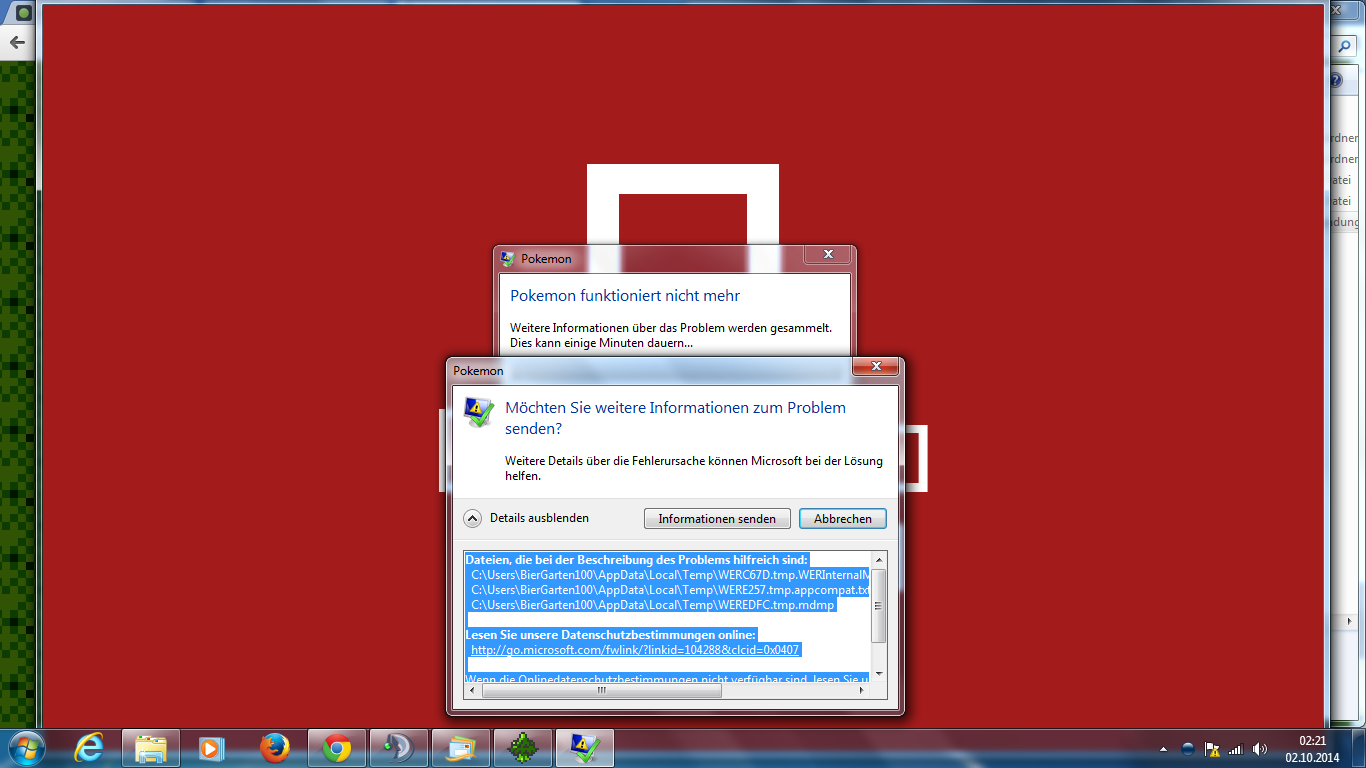
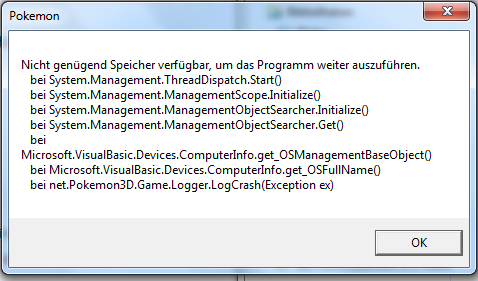
now ... i have first reinstal .NET Framework from nilllzz ... the game is crash now and give me this Error:


In the error log is this:
Dateien, die bei der Beschreibung des Problems hilfreich sind:
C:\Users\BierGarten100\AppData\Local\Temp\WERC67D.tmp.WERInternalMetadata.xml
C:\Users\BierGarten100\AppData\Local\Temp\WERE257.tmp.appcompat.txt
C:\Users\BierGarten100\AppData\Local\Temp\WEREDFC.tmp.mdmp

Lesen Sie unsere Datenschutzbestimmungen online:
http://go.microsoft.com/fwlink/?linkid=104288&clcid=0x0407

Wenn die Onlinedatenschutzbestimmungen nicht verfügbar sind, lesen Sie unsere Datenschutzbestimmungen offline:
C:\Windows\system32\de-DE\erofflps.txt

I Delet the Pokemon folder and download me all files new.
Pls. wait on my answer
 

BierGarten100

Starting Trainer
So... I have Delet all old files and folder... then i have creat a new folder white the name "Pokemon".
Then i have Download me the Launcher Version 2.3.0.0 and the Gamefiles Version 0.50.1 and put this in the folder "Pokemon".


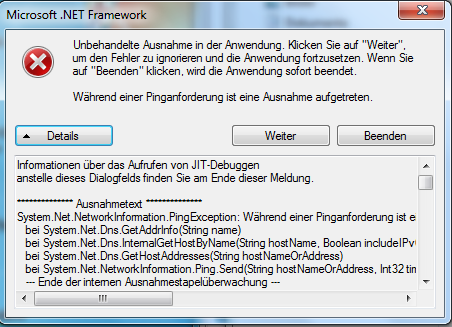
I have start the Pokémon3D.exe and this error comes:


The Error Code is her:
Code:
Informationen über das Aufrufen von JIT-Debuggen
anstelle dieses Dialogfelds finden Sie am Ende dieser Meldung.

************** Ausnahmetext **************
System.Net.NetworkInformation.PingException: Während einer Pinganforderung ist eine Ausnahme aufgetreten. ---> System.Net.Sockets.SocketException: Beim Datenbankaufruf ist ein nicht behebbarer Fehler aufgetreten
   bei System.Net.Dns.GetAddrInfo(String name)
   bei System.Net.Dns.InternalGetHostByName(String hostName, Boolean includeIPv6)
   bei System.Net.Dns.GetHostAddresses(String hostNameOrAddress)
   bei System.Net.NetworkInformation.Ping.Send(String hostNameOrAddress, Int32 timeout, Byte[] buffer, PingOptions options)
   --- Ende der internen Ausnahmestapelüberwachung ---
   bei System.Net.NetworkInformation.Ping.Send(String hostNameOrAddress, Int32 timeout, Byte[] buffer, PingOptions options)
   bei System.Net.NetworkInformation.Ping.Send(String hostNameOrAddress, Int32 timeout, Byte[] buffer)
   bei Microsoft.VisualBasic.Devices.Network.Ping(String hostNameOrAddress, Int32 timeout)
   bei Pokémon3D.Form1.Form1_Load(Object sender, EventArgs e)
   bei System.Windows.Forms.Form.OnLoad(EventArgs e)
   bei System.Windows.Forms.Form.OnCreateControl()
   bei System.Windows.Forms.Control.CreateControl(Boolean fIgnoreVisible)
   bei System.Windows.Forms.Control.CreateControl()
   bei System.Windows.Forms.Control.WmShowWindow(Message& m)
   bei System.Windows.Forms.Control.WndProc(Message& m)
   bei System.Windows.Forms.ScrollableControl.WndProc(Message& m)
   bei System.Windows.Forms.ContainerControl.WndProc(Message& m)
   bei System.Windows.Forms.Form.WmShowWindow(Message& m)
   bei System.Windows.Forms.Form.WndProc(Message& m)
   bei System.Windows.Forms.Control.ControlNativeWindow.OnMessage(Message& m)
   bei System.Windows.Forms.Control.ControlNativeWindow.WndProc(Message& m)
   bei System.Windows.Forms.NativeWindow.Callback(IntPtr hWnd, Int32 msg, IntPtr wparam, IntPtr lparam)


************** Geladene Assemblys **************
mscorlib
    Assembly-Version: 4.0.0.0.
    Win32-Version: 4.0.30319.17929 built by: FX45RTMREL.
    CodeBase: file:///C:/Windows/Microsoft.NET/Framework/v4.0.30319/mscorlib.dll.
----------------------------------------
Pokémon3D
    Assembly-Version: 2.3.0.0.
    Win32-Version: 2.3.0.0.
    CodeBase: file:///C:/Users/BierGarten100/Desktop/Pokemon/Pok%C3%A9mon3D.exe.
----------------------------------------
System.Windows.Forms
    Assembly-Version: 4.0.0.0.
    Win32-Version: 4.0.30319.17929 built by: FX45RTMREL.
    CodeBase: file:///C:/Windows/Microsoft.Net/assembly/GAC_MSIL/System.Windows.Forms/v4.0_4.0.0.0__b77a5c561934e089/System.Windows.Forms.dll.
----------------------------------------
System.Drawing
    Assembly-Version: 4.0.0.0.
    Win32-Version: 4.0.30319.17929 built by: FX45RTMREL.
    CodeBase: file:///C:/Windows/Microsoft.Net/assembly/GAC_MSIL/System.Drawing/v4.0_4.0.0.0__b03f5f7f11d50a3a/System.Drawing.dll.
----------------------------------------
System
    Assembly-Version: 4.0.0.0.
    Win32-Version: 4.0.30319.17929 built by: FX45RTMREL.
    CodeBase: file:///C:/Windows/Microsoft.Net/assembly/GAC_MSIL/System/v4.0_4.0.0.0__b77a5c561934e089/System.dll.
----------------------------------------
Microsoft.VisualBasic
    Assembly-Version: 10.0.0.0.
    Win32-Version: 11.0.50709.17929 built by: FX45RTMREL.
    CodeBase: file:///C:/Windows/Microsoft.Net/assembly/GAC_MSIL/Microsoft.VisualBasic/v4.0_10.0.0.0__b03f5f7f11d50a3a/Microsoft.VisualBasic.dll.
----------------------------------------
System.Core
    Assembly-Version: 4.0.0.0.
    Win32-Version: 4.0.30319.17929 built by: FX45RTMREL.
    CodeBase: file:///C:/Windows/Microsoft.Net/assembly/GAC_MSIL/System.Core/v4.0_4.0.0.0__b77a5c561934e089/System.Core.dll.
----------------------------------------
mscorlib.resources
    Assembly-Version: 4.0.0.0.
    Win32-Version: 4.0.30319.17929 built by: FX45RTMREL.
    CodeBase: file:///C:/Windows/Microsoft.Net/assembly/GAC_MSIL/mscorlib.resources/v4.0_4.0.0.0_de_b77a5c561934e089/mscorlib.resources.dll.
----------------------------------------
System.Configuration
    Assembly-Version: 4.0.0.0.
    Win32-Version: 4.0.30319.17929 built by: FX45RTMREL.
    CodeBase: file:///C:/Windows/Microsoft.Net/assembly/GAC_MSIL/System.Configuration/v4.0_4.0.0.0__b03f5f7f11d50a3a/System.Configuration.dll.
----------------------------------------
System.Xml
    Assembly-Version: 4.0.0.0.
    Win32-Version: 4.0.30319.17929 built by: FX45RTMREL.
    CodeBase: file:///C:/Windows/Microsoft.Net/assembly/GAC_MSIL/System.Xml/v4.0_4.0.0.0__b77a5c561934e089/System.Xml.dll.
----------------------------------------
System.resources
    Assembly-Version: 4.0.0.0.
    Win32-Version: 4.0.30319.17929 built by: FX45RTMREL.
    CodeBase: file:///C:/Windows/Microsoft.Net/assembly/GAC_MSIL/System.resources/v4.0_4.0.0.0_de_b77a5c561934e089/System.resources.dll.
----------------------------------------
System.Windows.Forms.resources
    Assembly-Version: 4.0.0.0.
    Win32-Version: 4.0.30319.17929 built by: FX45RTMREL.
    CodeBase: file:///C:/Windows/Microsoft.Net/assembly/GAC_MSIL/System.Windows.Forms.resources/v4.0_4.0.0.0_de_b77a5c561934e089/System.Windows.Forms.resources.dll.
----------------------------------------

************** JIT-Debuggen **************
Um das JIT-Debuggen (Just-In-Time) zu aktivieren, muss in der
Konfigurationsdatei der Anwendung oder des Computers
(machine.config) der jitDebugging-Wert im Abschnitt system.windows.forms festgelegt werden.
Die Anwendung muss mit aktiviertem Debuggen kompiliert werden.

Zum Beispiel:

<configuration>
    <system.windows.forms jitDebugging="true" />
</configuration>

Wenn das JIT-Debuggen aktiviert ist, werden alle nicht behandelten
Ausnahmen an den JIT-Debugger gesendet, der auf dem
Computer registriert ist, und nicht in diesem Dialogfeld behandelt.

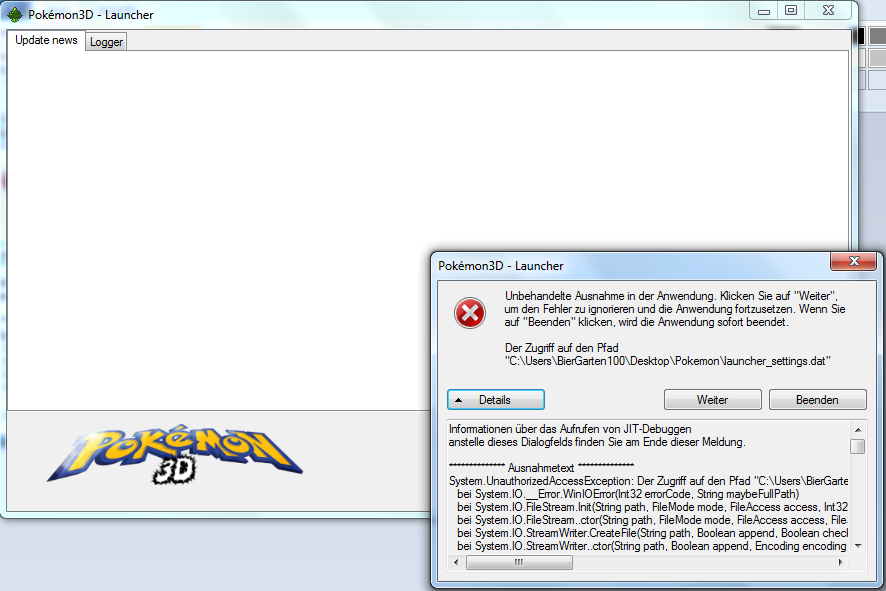
I push on "weiter" (in english = continue) and the Launcher start white this error:


The Error Code is this:
Code:
Informationen über das Aufrufen von JIT-Debuggen
anstelle dieses Dialogfelds finden Sie am Ende dieser Meldung.

************** Ausnahmetext **************
System.UnauthorizedAccessException: Der Zugriff auf den Pfad "C:\Users\BierGarten100\Desktop\Pokemon\launcher_settings.dat" wurde verweigert.
   bei System.IO.__Error.WinIOError(Int32 errorCode, String maybeFullPath)
   bei System.IO.FileStream.Init(String path, FileMode mode, FileAccess access, Int32 rights, Boolean useRights, FileShare share, Int32 bufferSize, FileOptions options, SECURITY_ATTRIBUTES secAttrs, String msgPath, Boolean bFromProxy, Boolean useLongPath, Boolean checkHost)
   bei System.IO.FileStream..ctor(String path, FileMode mode, FileAccess access, FileShare share, Int32 bufferSize, FileOptions options, String msgPath, Boolean bFromProxy, Boolean useLongPath, Boolean checkHost)
   bei System.IO.StreamWriter.CreateFile(String path, Boolean append, Boolean checkHost)
   bei System.IO.StreamWriter..ctor(String path, Boolean append, Encoding encoding, Int32 bufferSize, Boolean checkHost)
   bei System.IO.File.InternalWriteAllText(String path, String contents, Encoding encoding, Boolean checkHost)
   bei System.IO.File.WriteAllText(String path, String contents)
   bei Pokémon3D.Settings.CreateSettingsFile()
   bei Pokémon3D.Settings.GetSetting(String Name)
   bei Pokémon3D.Form1.GamefilesAvailable()
   bei Pokémon3D.Form1.UpdateGUI()
   bei Pokémon3D.Form1.ticknewupdate_Tick(Object sender, EventArgs e)
   bei System.Windows.Forms.Timer.OnTick(EventArgs e)
   bei System.Windows.Forms.Timer.TimerNativeWindow.WndProc(Message& m)
   bei System.Windows.Forms.NativeWindow.Callback(IntPtr hWnd, Int32 msg, IntPtr wparam, IntPtr lparam)


************** Geladene Assemblys **************
mscorlib
    Assembly-Version: 4.0.0.0.
    Win32-Version: 4.0.30319.17929 built by: FX45RTMREL.
    CodeBase: file:///C:/Windows/Microsoft.NET/Framework/v4.0.30319/mscorlib.dll.
----------------------------------------
Pokémon3D
    Assembly-Version: 2.3.0.0.
    Win32-Version: 2.3.0.0.
    CodeBase: file:///C:/Users/BierGarten100/Desktop/Pokemon/Pok%C3%A9mon3D.exe.
----------------------------------------
System.Windows.Forms
    Assembly-Version: 4.0.0.0.
    Win32-Version: 4.0.30319.17929 built by: FX45RTMREL.
    CodeBase: file:///C:/Windows/Microsoft.Net/assembly/GAC_MSIL/System.Windows.Forms/v4.0_4.0.0.0__b77a5c561934e089/System.Windows.Forms.dll.
----------------------------------------
System.Drawing
    Assembly-Version: 4.0.0.0.
    Win32-Version: 4.0.30319.17929 built by: FX45RTMREL.
    CodeBase: file:///C:/Windows/Microsoft.Net/assembly/GAC_MSIL/System.Drawing/v4.0_4.0.0.0__b03f5f7f11d50a3a/System.Drawing.dll.
----------------------------------------
System
    Assembly-Version: 4.0.0.0.
    Win32-Version: 4.0.30319.17929 built by: FX45RTMREL.
    CodeBase: file:///C:/Windows/Microsoft.Net/assembly/GAC_MSIL/System/v4.0_4.0.0.0__b77a5c561934e089/System.dll.
----------------------------------------
Microsoft.VisualBasic
    Assembly-Version: 10.0.0.0.
    Win32-Version: 11.0.50709.17929 built by: FX45RTMREL.
    CodeBase: file:///C:/Windows/Microsoft.Net/assembly/GAC_MSIL/Microsoft.VisualBasic/v4.0_10.0.0.0__b03f5f7f11d50a3a/Microsoft.VisualBasic.dll.
----------------------------------------
System.Core
    Assembly-Version: 4.0.0.0.
    Win32-Version: 4.0.30319.17929 built by: FX45RTMREL.
    CodeBase: file:///C:/Windows/Microsoft.Net/assembly/GAC_MSIL/System.Core/v4.0_4.0.0.0__b77a5c561934e089/System.Core.dll.
----------------------------------------
mscorlib.resources
    Assembly-Version: 4.0.0.0.
    Win32-Version: 4.0.30319.17929 built by: FX45RTMREL.
    CodeBase: file:///C:/Windows/Microsoft.Net/assembly/GAC_MSIL/mscorlib.resources/v4.0_4.0.0.0_de_b77a5c561934e089/mscorlib.resources.dll.
----------------------------------------
System.Configuration
    Assembly-Version: 4.0.0.0.
    Win32-Version: 4.0.30319.17929 built by: FX45RTMREL.
    CodeBase: file:///C:/Windows/Microsoft.Net/assembly/GAC_MSIL/System.Configuration/v4.0_4.0.0.0__b03f5f7f11d50a3a/System.Configuration.dll.
----------------------------------------
System.Xml
    Assembly-Version: 4.0.0.0.
    Win32-Version: 4.0.30319.17929 built by: FX45RTMREL.
    CodeBase: file:///C:/Windows/Microsoft.Net/assembly/GAC_MSIL/System.Xml/v4.0_4.0.0.0__b77a5c561934e089/System.Xml.dll.
----------------------------------------
System.resources
    Assembly-Version: 4.0.0.0.
    Win32-Version: 4.0.30319.17929 built by: FX45RTMREL.
    CodeBase: file:///C:/Windows/Microsoft.Net/assembly/GAC_MSIL/System.resources/v4.0_4.0.0.0_de_b77a5c561934e089/System.resources.dll.
----------------------------------------
System.Windows.Forms.resources
    Assembly-Version: 4.0.0.0.
    Win32-Version: 4.0.30319.17929 built by: FX45RTMREL.
    CodeBase: file:///C:/Windows/Microsoft.Net/assembly/GAC_MSIL/System.Windows.Forms.resources/v4.0_4.0.0.0_de_b77a5c561934e089/System.Windows.Forms.resources.dll.
----------------------------------------

************** JIT-Debuggen **************
Um das JIT-Debuggen (Just-In-Time) zu aktivieren, muss in der
Konfigurationsdatei der Anwendung oder des Computers
(machine.config) der jitDebugging-Wert im Abschnitt system.windows.forms festgelegt werden.
Die Anwendung muss mit aktiviertem Debuggen kompiliert werden.

Zum Beispiel:

<configuration>
    <system.windows.forms jitDebugging="true" />
</configuration>

Wenn das JIT-Debuggen aktiviert ist, werden alle nicht behandelten
Ausnahmen an den JIT-Debugger gesendet, der auf dem
Computer registriert ist, und nicht in diesem Dialogfeld behandelt.
Sooooo... i have creat a new file white the name "launcher_settings.dat" and the code inside from the file is this:
Code:
game_updates|1
autostart|0
autostart_time|10
game_path|[Default]
game_version|[Latest]
restart_launcher|0
now the Launcher start white the first error but i push on "weiter" and the second error is away.
I push on the button "Start Game" and this error comes:


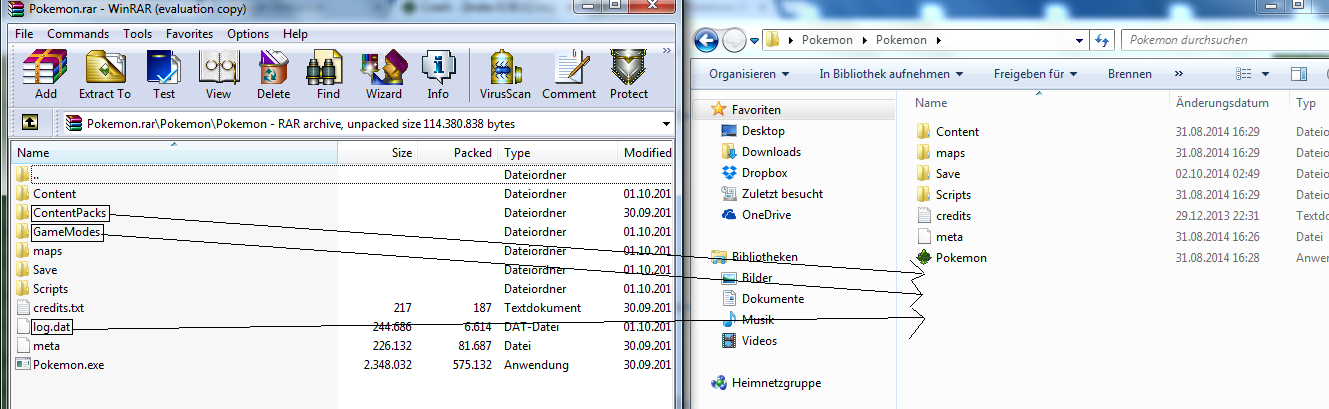
Now you (Wuppertaler93) have send me your "Pokemon" folder and i can change all missing files.


Ok i have delet the "log.dat" file. This file is not so important. And the same problem is detected.
sooo... I replaced all the files from your folder in my folder and the same problem from this image is coming:


White this Code:
Code:
Dateien, die bei der Beschreibung des Problems hilfreich sind:
  C:\Users\BierGarten100\AppData\Local\Temp\WER62.tmp.WERInternalMetadata.xml
  C:\Users\BierGarten100\AppData\Local\Temp\WER1A1A.tmp.appcompat.txt
  C:\Users\BierGarten100\AppData\Local\Temp\WER1EDC.tmp.mdmp

Lesen Sie unsere Datenschutzbestimmungen online:
  http://go.microsoft.com/fwlink/?linkid=104288&clcid=0x0407

Wenn die Onlinedatenschutzbestimmungen nicht verfügbar sind, lesen Sie unsere Datenschutzbestimmungen offline:
  C:\Windows\system32\de-DE\erofflps.txt
So my last step was this... i have create the file "ID.dat" and but in the file this Code:
Code:
0.50.1
and resultat from this is the same problem ^^

Now... i hope all this is helpful for answer a good help method :D
 
Last edited:

Fanta

Content Developer
P3D Developer
Global Moderator
Look the Tread pls and you see this "Then i have Download me the Launcher Version 2.3.0.0 and the Gamefiles Version 0.50.1 and put this in the folder "Pokemon"."

I say to this ... GG
GG as in fixed?
 
Top