
-
✨ ARCHIVE MODE ✨
The forum has now been set to read-only mode, no new posts, resources, replies etc will not be possible.
We recommend you join our Discord server to get real-time response: Discord Invite Link
Can't seem to get content packs to work
- Thread starter DementedDinos
- Start date

DementedDinos
Trainer
That would probably help. Thank you guys(and girls if any of you are in fact girls) for trying to help me.

DementedDinos
Trainer
Both of them have that

Like this one?But are the folder structures actually like that?
Can you go into a ContentPack folder and make a screenshot?
Here it is

Images don't appear in quotes, I suggest the image link.Like this one?
DementedDinos
Trainer
Like this Nilllz?
Attachments
-
 153.7 KB Views: 375

Khaotixsin
Starting Trainer
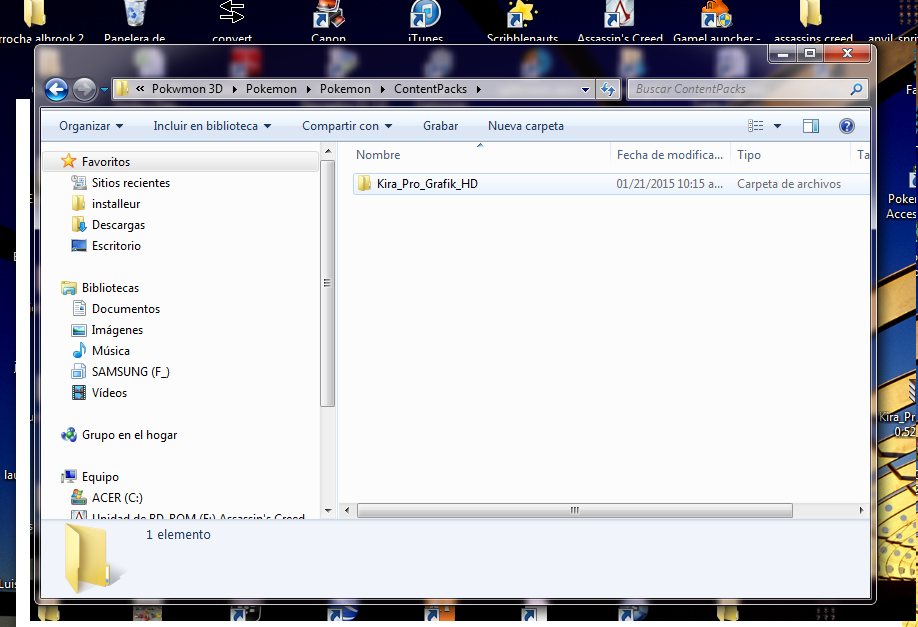
Hello, i dunno but think i had the same problem as you pal; just extract the .rar or .zip; suposing is kiraprografikhd you will get a folder with same name, just take that folder and put it in contentpack and thats all
Attachments
-
 198.3 KB Views: 365

SViper
Active Member
After that you need go to game, in main menu press pokeball icon, then enable it and apply.Hello, i dunno but think i had the same problem as you pal; just extract the .rar or .zip; suposing is kiraprografikhd you will get a folder with same name, just take that folder and put it in contentpack and thats all View attachment 7927