

Describe the bug you experienced here.
What I expected to happen:
The symbol "é" to display correctly in the info.dat part of the Content Pack in-game.
What actually happened:
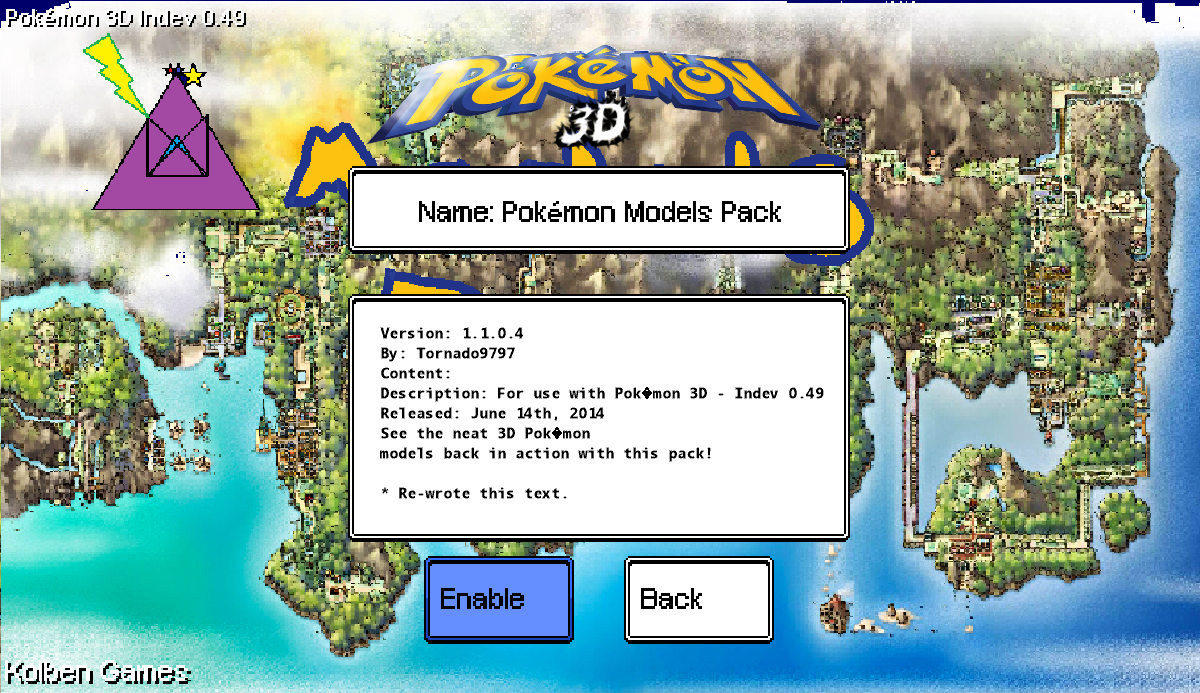
The symbol was instead replaced with a strange symbol that might resemble a black box with a question mark in the center (symbol for missing symbol).
Steps to reproduce:
1. Create a Content Pack (guide here)
2. Anywhere in the info.dat file, insert a "é" symbol.
3. Open up the game and check that Content Pack's information button. The symbol should replace the "é" symbol.
(Add a crash log here if available and enclose it in the code tag with this button:
 )
)
(No Crash Occurred)
What I expected to happen:
The symbol "é" to display correctly in the info.dat part of the Content Pack in-game.
What actually happened:
The symbol was instead replaced with a strange symbol that might resemble a black box with a question mark in the center (symbol for missing symbol).
Steps to reproduce:
1. Create a Content Pack (guide here)
2. Anywhere in the info.dat file, insert a "é" symbol.
3. Open up the game and check that Content Pack's information button. The symbol should replace the "é" symbol.
(Add a crash log here if available and enclose it in the code tag with this button:
(No Crash Occurred)
