Ok, so I downloaded pokemon 3d launcher, and when i run it under update news says "Navigation to the webpage was cancelled" and when i click download latest version the download button is greyed out and will not let me do. I have tried downloading game and putting it in a folder with launcher. I have checked .net and its 4.5 and also did the other xna, no but the game still will not work for me....help!

-
✨ ARCHIVE MODE ✨
The forum has now been set to read-only mode, no new posts, resources, replies etc will not be possible.
We recommend you join our Discord server to get real-time response: Discord Invite Link
Internet Connection Issues
- Thread starter DaBenji
- Start date
J
jianmingyong
Guest
First, make sure that you have downloaded the new launcher at the download page.
If the launcher allows you to download the latest version, you are fine.
Else download the gamefile at the download page, extract it and place it near the launcher.
If the launcher cannot find your files, goto the launcher setting => Files => search for the pokemon folder and press ok.
You should have the play button enabled after that
If the launcher allows you to download the latest version, you are fine.
Else download the gamefile at the download page, extract it and place it near the launcher.
If the launcher cannot find your files, goto the launcher setting => Files => search for the pokemon folder and press ok.
You should have the play button enabled after that

When you press the "Create account" button it will open this page in your default browser : http://gamejolt.com/signupWhen i click the lightning bold to create a gamejolt icon it says please wait and doesn't do anything....
Judging by the similarities of your issues, it seems that you have a problem with your Internet connection or with your Firewall.
try to turn off your anti-virus for a min.
J
jianmingyong
Guest
Some anti virus block this game as well Example: AVG internet security.
Example: AVG internet security.Well, I disabled my firewall and avg, and still navigation to page cancelled on update blog. I wouldn't mind having online options, as I created a gamejolt account. But I do not know what the issue is, as it will not let the launcher or game have online access for whatever reason.
Did you try to download the game files from this link? http://pokemon3d.net/downloads/Well, I disabled my firewall and avg, and still navigation to page cancelled on update blog. I wouldn't mind having online options, as I created a gamejolt account. But I do not know what the issue is, as it will not let the launcher or game have online access for whatever reason.
Yes, I got all my files from there actually. I just tried again with launcher and it said "
> Running executable file.
> Listing program properties:
> PROGRAMNAME: Pokémon3D Launcher
> VERSION: 2.3.0.0
> Started the application
> Cannot reach news page. Loading error page.
> Checking for new game updates...
> Failed to properly check for new updates."
on logger. Also the update news said "You cannot connect to the interwebs" "The news could not be loaded...." which is different, but i guess still same result of not being online.
I have uninstalled .netframe 4.5 and reinstalled to make sure that wasn't it, also have avg and firewall off to check to make sure those aren't the problem.
> Running executable file.
> Listing program properties:
> PROGRAMNAME: Pokémon3D Launcher
> VERSION: 2.3.0.0
> Started the application
> Cannot reach news page. Loading error page.
> Checking for new game updates...
> Failed to properly check for new updates."
on logger. Also the update news said "You cannot connect to the interwebs" "The news could not be loaded...." which is different, but i guess still same result of not being online.
I have uninstalled .netframe 4.5 and reinstalled to make sure that wasn't it, also have avg and firewall off to check to make sure those aren't the problem.
Last edited by a moderator:
That happens to me when my connection is almost dead for some reason,Yes, I got all my files from there actually. I just tried again with launcher and it said "
> Running executable file.
> Listing program properties:
> PROGRAMNAME: Pokémon3D Launcher
> VERSION: 2.3.0.0
> Started the application
> Cannot reach news page. Loading error page.
> Checking for new game updates...
> Failed to properly check for new updates."
on logger. Also the update news said "You cannot connect to the interwebs" "The news could not be loaded...." which is different, but i guess still same result of not being online.
the site is probably blocked by your internet connection or your connection is very bad, are you on a work/school connection by any chance? and how fast is your connection atm?
I am at home, my connection is highspeed. It isn't great, but its good enough to play games with 0 lag and netflix with rarely having to buffer lol
This is the screen It pulls up 99% of time though
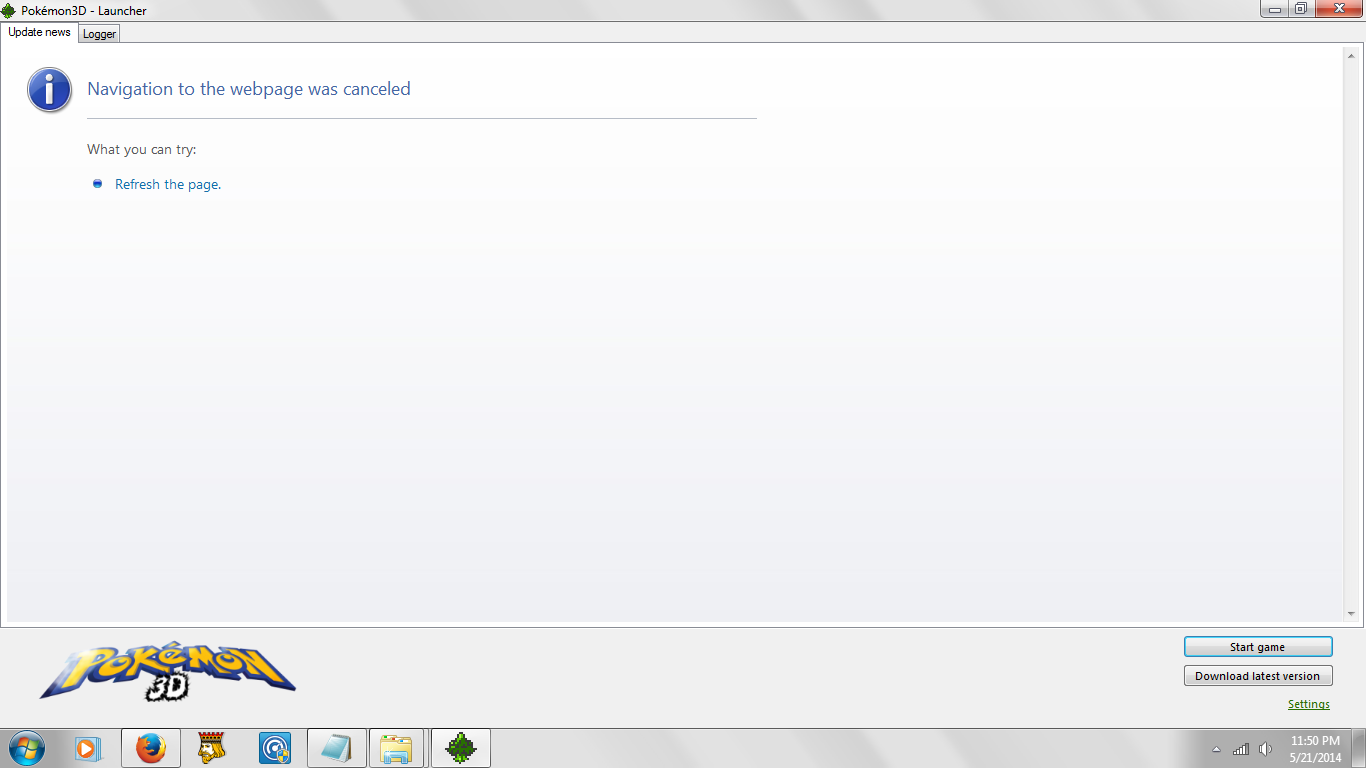
> Running executable file.
> Listing program properties:
> PROGRAMNAME: Pokémon3D Launcher
> VERSION: 2.3.0.0
> Started the application
> Opening news page
> Checking for new game updates...
> Failed to properly check for new updates.
is for logger
This is the screen It pulls up 99% of time though
> Running executable file.
> Listing program properties:
> PROGRAMNAME: Pokémon3D Launcher
> VERSION: 2.3.0.0
> Started the application
> Opening news page
> Checking for new game updates...
> Failed to properly check for new updates.
is for logger
Last edited by a moderator:
J
jianmingyong
Guest
There must be something blocking the game connection.
I know you tried turing off firewall and anti virus.
I know you tried turing off firewall and anti virus.
J
jianmingyong
Guest
Can you see the blog post here:
http://nilllzz.tumblr.com
It seem like the launcher cannot access this site.
http://nilllzz.tumblr.com
It seem like the launcher cannot access this site.
J
jianmingyong
Guest
Is the gamejolt stuck at loading and not downloading profile?