

- Download/install hamachi: https://secure.logmein.com/products/hamachi/download.aspx
- Once it is installed you open it up hit it's start button, it'll connect to their servers.
- Then you create a 'network' like so, use an unique name

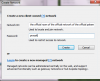
- You give this name and password to your friends. They click 'join an existing network' and join that.
- When the players want to join you they need to get your IP. Right click your name from the network peers list in Hamachi and select copy ip address, and use that to join in-game.