
-
✨ ARCHIVE MODE ✨
The forum has now been set to read-only mode, no new posts, resources, replies etc will not be possible.
We recommend you join our Discord server to get real-time response: Discord Invite Link
Trainer Sprites
- Thread starter PikaTopher
- Start date
- Status
- Not open for further replies.


perhaps, but if nilllzz wants to use trainers from games that'd be hard to fit in. down the road it'd be a nice system to have in parrallel with what we got but i think in the end the easiest option would be to let people use custom skins in multiplayer, either making it default to a known sprite on clients that are playing with them or having the custom skin replicate across the network. though it'd be even easier if we had a server for providing that service, perhaps when/if we do a friends list ingame minecraft style custom skins uploaded to your profile could be done. that way when you join someone's game their client can ask the master server for that account's skin and use a fallback one until its donwloaded then swap the skin when a copy is available locallyCustomizable sprites would be better, use a base sprite and then just add various options for hair,shirt,pants and shoes.
Grey Rabbit
Trainer
I've always loved user created content, Neverwinter Nights was an amazing example of what a community could produce. The unfortunate side effect is that eventually, no matter what game, you get crude sprites with dirty bits downloaded into your game before you know it. I don't mind the custom skin thing, but the replication thing is a bad idea, especially in a game for ages 6 and up. Just my two cents...
-Rabbit
-Rabbit

heres an idea! Im currently making skin packs that you guys can use, iv already made 3 as playable characters! for each pack i post will have 8 Playable characters.
an example i can show you is My Skin-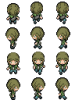
these skins i will post in a seperate section of the forums to be used by people around the PK3D Community! ^ ^
an example i can show you is My Skin-
these skins i will post in a seperate section of the forums to be used by people around the PK3D Community! ^ ^
make a thread in unofficial dev about it, mateheres an idea! Im currently making skin packs that you guys can use, iv already made 3 as playable characters! for each pack i post will have 8 Playable characters.
an example i can show you is My Skin- View attachment 250
these skins i will post in a seperate section of the forums to be used by people around the PK3D Community! ^ ^
Haha Will do Good Sir ^ ^make a thread in unofficial dev about it, mateheres an idea! Im currently making skin packs that you guys can use, iv already made 3 as playable characters! for each pack i post will have 8 Playable characters.
an example i can show you is My Skin- View attachment 250
these skins i will post in a seperate section of the forums to be used by people around the PK3D Community! ^ ^
W
Whitney
Guest
Hey guys! I'm really new when it comes to sprites and actually know little to nothing about them.
I've obtained a sheet of Whitney's overworld sprites from HG/SS... but the order in which she's facing isn't correct. (In-game, when I move forward, instead of it being the other walking-forward sprite, Whitney faces to the right lol).
Here's the sheet:

How exactly do I face her correctly? Or rather, correctly order her sprites. Again, I'm new to this ^.^;
I've obtained a sheet of Whitney's overworld sprites from HG/SS... but the order in which she's facing isn't correct. (In-game, when I move forward, instead of it being the other walking-forward sprite, Whitney faces to the right lol).
Here's the sheet:
How exactly do I face her correctly? Or rather, correctly order her sprites. Again, I'm new to this ^.^;

Splint
Champion
Step 1:
Trainer sprites sheets are 96 x 128 so 32 pixels big per sprite and will look like this
View attachment 115
What i like to do is create a grid on a separate layer i use paint.net with gridmaker plugin for this.I'd love it if there was a coherent tutorial for putting custom Trainer sprites in the game, since I have the spriting knowledge to make them, buuut I lack the technical knowhow to do so. ^^;Step 1:
Trainer sprites sheets are 96 x 128 so 32 pixels big per sprite and will look like this
View attachment 115
U can edit this one if u want and save it.
Step 2:
To convert the sprite to a usable format for the game u can use a program called XNA Formatter this will convert it to xnb
Available from here:
http://sourceforge.net/projects/xnbbuilder/
Step 3:
Name your file to something u like and place it in the following folder:
Pokemon3D\Pokemon\Content\Textures\NPC\
Step 4:
Go to your save folder located at Pokemon3D\Pokemon\Save\<Your Ingame Name>
open up the file named Player.dat in notepad or wordpad or any text editing program.
Inside it will look something like this
The part we are interested in is thisCode:Name|Test Position|2,0.1,2 MapFile|yourroom.dat Rotation|4.767895 RivalName|??? Money|3000 Badges|0 Gender|Male PlayTime|0,2,55 OT|18147 Points|0 hasPokedex|0 freeCamera|1 thirdPerson|0 skin|Red location|Your Room battleAnimations|1 BoxAmount|5 LastRestPlace|yourroom.dat LastRestPlacePosition|1,0.1,3 DiagonalMovement|0 RepelSteps|0 LastSavePlace|barktown0.dat LastSavePlacePosition|8,0.09602252,-1
All you need to do is replace "Red" with the name u have given to your xnb file.Code:skin|Red
Save it and you are done.
Note:
If u tend on using this on multiplayer the person whom you are playing co-op with needs to have this file as well before connecting to your session.
Then all i have to do is just cut and paste each image into the correct position so they look the same as the picture below
here's what i do, i take an existing p3d sprite sheet that is close to the shape of the character you're doing. like for whitney i'd use nurse joy.Hey guys! I'm really new when it comes to sprites and actually know little to nothing about them.
I've obtained a sheet of Whitney's overworld sprites from HG/SS... but the order in which she's facing isn't correct. (In-game, when I move forward, instead of it being the other walking-forward sprite, Whitney faces to the right lol).
Here's the sheet:
How exactly do I face her correctly? Or rather, correctly order her sprites. Again, I'm new to this ^.^;
make a new layer in paint.net, gimp, paintshop pro or w/e and order it over the original layer
find the correct sprite for each place, copy it from the sheet you posted onto the new layer you made, line them up so they're in the same place as the character you're using as a template. i like to line the feet and hands up, they match easily.
once all the frames are in the correct place delete the original layer, so only your whitney sprite frames remain
save it to a new png file and compile it to xnb, place it in /Pokemon/Content/Textures/NPC/
W
Whitney
Guest
Thanks guys! <3
yeah, it was confusing until i saw Draco's Red sprite. hopefully you'll be happy with your Whitney :']
and Welcome to the Poke3D Community! ^ ^
W
Whitney
Guest
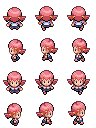
I think I got it to work! Keyword "think".

And thanks for the welcome. :3
that looks about right.
I think I got it to work! Keyword "think".
And thanks for the welcome. :3
i'll go try it out aswell, i can use it to add new characters in 1YL :']
- Status
- Not open for further replies.