• ✨ ARCHIVE MODE ✨
    The forum has now been set to read-only mode, no new posts, resources, replies etc will not be possible.
    We recommend you join our Discord server to get real-time response: Discord Invite Link

Trainer Sprites

Status
Not open for further replies.

DracoHouston

Kolben Developer
Contributor
Yes, that would be a good idea. A simple check to see if it is one of the defaults and possibly store a temporary value so that it can change you back to your custom skin when you finish co-op.
I have no idea how player data like what character sprite they are is replicated to clients etc but it probably doesn't need to touch the save games at all, the fallback could be client side, other players without your skin could just see trainer red or something. as a stop gap measure your solution could be good for at least making sure the game doesn't crash if this scenario happens
 

Saruish

Dragon Tamer
Or he could add support for texture packs :)
The way maps are made would make it hard to do unless the texture packs were forced to be the same resolution, if someone is going to do things like heartgold/soulsilver texture packs they'd have to go through and realign all the textures in the maps, which would have to be done as a mod or something.
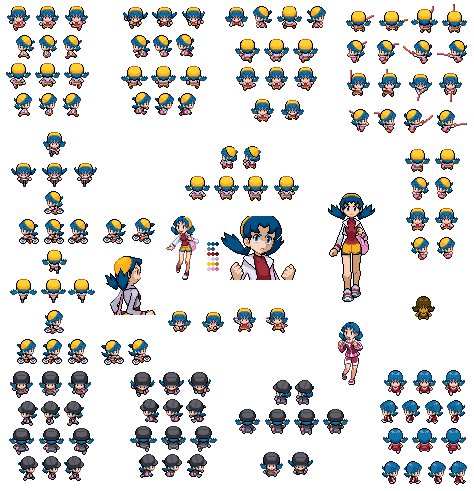
I've been messing around and have made a few sprites. Put them into Pokemon/Content/Textures/NPC
If you want to play as them change your Player.dat in your save.

You can get them here:
http://www.mediafire.com/?ylippdf4s0ptf
Did you ever test this with coop? What happens if you join a game with a character using a sprite that isn't in the other player's local files? If the game doesn't handle this for people already the ability to use a custom character sprite and have it show up in coop games would be kinda cool.

Also, I'd really like to see more character sprites, a new one was added this patch so things are looking up :)
prehaps we should make sprites from every game, including hack roms and the pokemon card game for the gba.
Add everyone, including the Badarse from your avatar. I'm a huge fan of letting players express themselves through their player character and don't mind sacrificing purity for it.
lol I did this avy my self XD but it was from a series I was doing. as well as my friends as well.


@ the others. they could add a file checkier that checks to see if the files are different. when it different it askes if the player wishes to download the different file. they click yes and it downloads the custom stuff from the other person. Some games out there has that.
 
I was thinking about this today a bit. I'm not sure how the data storage is set up but I think that the simplest way to set up something that would keep the flavor of the old avatars but lots of customization would be to double the number of sprites that makes each avatar is made up of. You could separate the heads off of all of the sprites and shift the hair colors and what not and then shift the clothing colors for more options.

Essentially, it would take double the time to draw each avatar(which shouldn't be a huge deal in this case). It should take two bytes of storage per avatar(if you use the variable "byte", it takes up up 1 byte of storage and can be a number from 0-255, setting a hard limit on the number of heads and clothing each, but 256 of each looks like a good number of options to me).

The "big" resource hog will be the sprites themselves, particularly the clothing. 256 heads only have to face 4 directions but clothing has to animate in 4 directions.

If you think of all of the people sprites in the game, there's plenty of resources in the game, guaranteed to be same style, to pull from.

-Rabbit
 

Saruish

Dragon Tamer
I was thinking about this today a bit. I'm not sure how the data storage is set up but I think that the simplest way to set up something that would keep the flavor of the old avatars but lots of customization would be to double the number of sprites that makes each avatar is made up of. You could separate the heads off of all of the sprites and shift the hair colors and what not and then shift the clothing colors for more options.

Essentially, it would take double the time to draw each avatar(which shouldn't be a huge deal in this case). It should take two bytes of storage per avatar(if you use the variable "byte", it takes up up 1 byte of storage and can be a number from 0-255, setting a hard limit on the number of heads and clothing each, but 256 of each looks like a good number of options to me).

The "big" resource hog will be the sprites themselves, particularly the clothing. 256 heads only have to face 4 directions but clothing has to animate in 4 directions.

If you think of all of the people sprites in the game, there's plenty of resources in the game, guaranteed to be same style, to pull from.

-Rabbit
well we have figure out how to import our characters. Which im currently editing my own at the moment.
 
That's fine as a custom thing, I'm talking about as part of the in-game character creation process, though. With default stuff, it makes multiplayer information transfer more simple. The game says "Here's Saruish, his avatar is head 23 and body 56. Draw that."
 

Saruish

Dragon Tamer
That's fine as a custom thing, I'm talking about as part of the in-game character creation process, though. With default stuff, it makes multiplayer information transfer more simple. The game says "Here's Saruish, his avatar is head 23 and body 56. Draw that."
ah hmmm...
 

DracoHouston

Kolben Developer
Contributor
I was thinking about this today a bit. I'm not sure how the data storage is set up but I think that the simplest way to set up something that would keep the flavor of the old avatars but lots of customization would be to double the number of sprites that makes each avatar is made up of. You could separate the heads off of all of the sprites and shift the hair colors and what not and then shift the clothing colors for more options.

Essentially, it would take double the time to draw each avatar(which shouldn't be a huge deal in this case). It should take two bytes of storage per avatar(if you use the variable "byte", it takes up up 1 byte of storage and can be a number from 0-255, setting a hard limit on the number of heads and clothing each, but 256 of each looks like a good number of options to me).

The "big" resource hog will be the sprites themselves, particularly the clothing. 256 heads only have to face 4 directions but clothing has to animate in 4 directions.

If you think of all of the people sprites in the game, there's plenty of resources in the game, guaranteed to be same style, to pull from.

-Rabbit
If you could set a pixel (with a certain colour in the image itself) as the attachment point for the head then animating the body while keeping the head at the right place would be easier. Storage of all this stuff isn't an issue. They are made of compressed png files that are really small, here's hilda, to give you an idea how they work now.


The big problem I see is not a technical one, but artistic. These characters are very stylized and I don't know if swapping heads with bodies would even look good at all. It would require a rethink of the character sprites, IMO.
 
There's one way to find out. I may try an experiment later to see how it comes out. I have an old version of Photoshop. I just need to find two trainer sprites, preferably of the same gender so I can check the head heights. Each sprite may just need a variable that basically says, "This body needs it's head at +1 y pixels" which would look a little something like this...

******************

spriteX and spriteY - upperleft corner of of avatar
bodyHeight - height adjustment for height to match it on the body
headHeight - Vertical distance body is dropped down from top of avatar

(I don't know DX so I'm going old school psuedo code here)
bitblt toBBuffer spriteX, spriteY+headHeight fromBodySource -draws the body to buffer adjusted below the head
bitblt toBBuffer spriteX, SpriteY+bodyHeight fromHeadSource -overlaps the head over body, adjusted to connect necks


*********************

-Rabbit
 

DracoHouston

Kolben Developer
Contributor
There's one way to find out. I may try an experiment later to see how it comes out. I have an old version of Photoshop. I just need to find two trainer sprites, preferably of the same gender so I can check the head heights. Each sprite may just need a variable that basically says, "This body needs it's head at +1 y pixels" which would look a little something like this...
-Rabbit
You could do that too, I just thought doing it like sockets/attachments in fps games do it would be hella flexible and not require another data file
Here are some more

head height is fairly consistent i just dont think you can have these heads with a different body and have it look good. try and shop some head swaps up and post them and we'll see how well it works
 
Here's how I see it working best...

The sprite sheets aren't the same size, so that needs to change first. I'm thinking a nice, common 96x128 pixels(Red is the biggest by 4 pix). This will put the xy values of the upper left corner of all of the frames match.

Next we have to decide on a common color pallet. What this does is makes all of the reds the same red, all of the greens the same, etc. It'll take some rework, but it'll make it look better when you put Hilbert's head on Red's body. I wouldn't use special NPC sprites (professors, nurses, etc) as character parts, but stealing their colors would add in options.

I don't have too much time to work on this today, but let me see what I can whip up in a few days. If you guys have any specific needs for these files to be used as resources, let me know(image sizes and the like). Just adding 2 male heads and 2 male bodies makes 4 character designs. If you add 2 hair colors to each head, you double that to 8. It could be worth it but it'll take a little bit of work.
 

Tav

Fisherman
<< Needless to say, Hilbert looks absolutely fabulous on high heels.

I also think Oak's body simply requires a big head to fit with it.

This was a quick swapping really. Fitting both parts is on photoshop really simple copy/paste work, and each head fits in differently with another's body. I don't know if it's as easy using "a simple program" to shift the head 2 pixels up if Oak's body is used, or 2 pixels down if nurse Joy's body is used.
 
I managed to get a bit of time and made these male trainer sprites. This is phase 1, making the colors match and the "necks" at the same height. Next is to separate the heads off of the bodies but leave them at the same height to make two files.

I had to add 2 pixels height to Red and I'm not a very good at making sprites so if it needs fixing someone else may want to do it. I can pull the head off of the HG/SS guy, but the side views are killing me.

Also, I pulled the major clothing colors and made a common pallet. Does this look usable, at least for a start?
Male Trainers p1.pngPokeColors.png
-Rabbit
 

Tav

Fisherman
They certainly look awesome for a start ;) I have finals this week so I can't spend too much time on it, but I'll do some recoloring of female trainer as well using your color pallet.
 
If I have some time tonight, I'll work on a hair pallet for the heads. There's ultimately a few ways of doing this and it has to be decided early on by anyone who'd want to use this stuff. It basically comes down to how much information the programmers are willing to store and how many sliders they're willing to add at character creation.

1. Make a bunch of sprite sets that are set sprites, which is what P3D has now with it's single slider. In this case it would just be increasing the number of options.

2. Separate the bodies from the heads and put all male and female bodies on top and all of the heads on the bottom, allowing any head on any body. This leaves avatar data storage at 2-4 pieces of information, which body and which head. If you make a slider for colors, you can cut the time it takes to find what you want significantly.

3. If you separate gender for heads and bodies, you add another variable in, but you make the number of heads and bodies you have to sort through to find the one you want get cut in half. Also, gender information can be handy to have in making a game for story and what not, so this info can be pulling double duty. With 0 for male and 1 for female, you can still use math to pull the right sprite, too.

4. Hair colors... If you want to make just four hair colors per head style, you increase the number of sprites you have to sort through, but you can add another slider for that, too. Pick Red's hat in blue and then black hair.

5. Skin tones get over looked in JP games because they aren't the melting pot that some countries are. They make what the see everyday and there's nothing wrong with that. I don't think it would hurt to consider this option for two, maybe three skin tones- pale and dark, maybe add a medium. This will have a bigger effect on the number of sprites than one would think, though.

Some math to show the number of options with, because it gets big fast.
4 bodies /w heads(M&F) x 4 colors = 16 character options
4 bodies x 4 colors x 4 heads x 4 colors = 256 combos which can be cut in half with gender segregation
if you make for hair colors for those heads = 1024 combos without gender segregation

It just goes to show that you can add a lot from relatively little with a bit of planning.

-Rabbit

 
Status
Not open for further replies.
Top