
-
✨ ARCHIVE MODE ✨
The forum has now been set to read-only mode, no new posts, resources, replies etc will not be possible.
We recommend you join our Discord server to get real-time response: Discord Invite Link
Pokeditor - The P3D map editor | testing build available
- Thread starter DracoHouston
- Start date
- Status
- Not open for further replies.


Splint
Champion
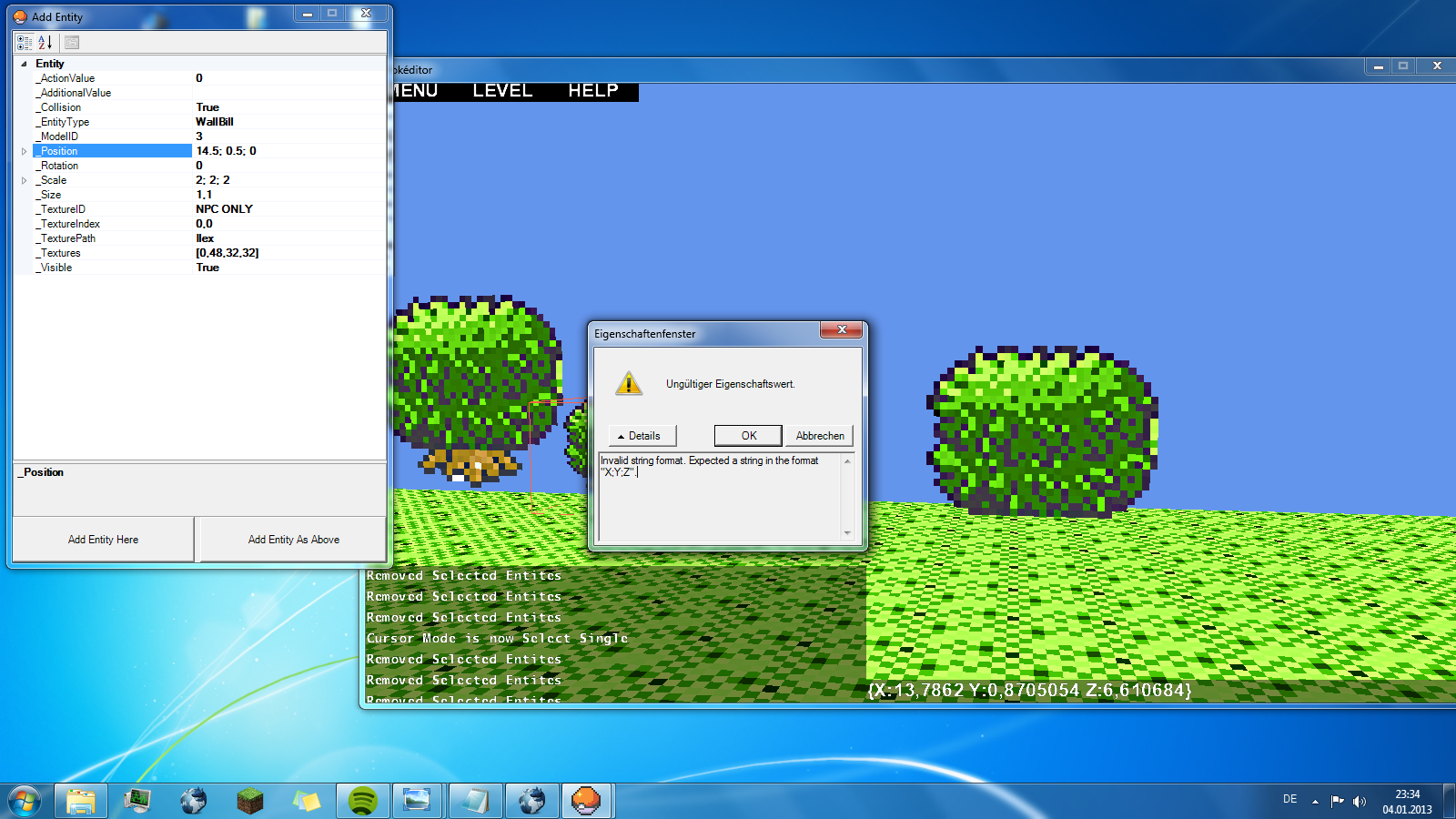
Strange seems it puts ; instead of , try changing it to only , without adding decimals and try saving the map see if it comes up with the same error messagethe problem is, that even if I type in any decimal number the editor doesn't take it as one ... it gives out an error message and changes the variables back.
Splint
Champion
Are u using the "Add Entity Here" Button? Draco told me earlier today that he knows about it and by default always reverts to 0,0,0 u have to use the "Add Entity as Above" button for it to work
Edit:
Ok after re-reading the post saying it works in game but not the editor then it is something that has to be changed in the editor the way it reads the lines or saves them this is something draco has to do in his code.
I imagine nilllzz put in some sort of check for this kind of stuff when we had problems with the pokemon .dat files having comma's instead of dots at least that is my best guess.
I cant help u any further then that i am sorry :/
Edit:
Ok after re-reading the post saying it works in game but not the editor then it is something that has to be changed in the editor the way it reads the lines or saves them this is something draco has to do in his code.
I imagine nilllzz put in some sort of check for this kind of stuff when we had problems with the pokemon .dat files having comma's instead of dots at least that is my best guess.
I cant help u any further then that i am sorry :/

JojoP
Pokémon Ranger
I use "Add Entity as above" ...
But decimals only work when I put them in manually with a text editor.
Edit: When I make the trees how I want them with decimals and stuff and open the map ingame everything looks fine. When I open it with the editor all tree entities are placed at 0.0.0 and when I save the editor removes all "," from the code. I can fix that, but with every tree I make that are 2 more "," to change everytime I save ...
+Question: Sometimes when I build some WallBlocks the AddEntity window doesn't let me change the values for the textures. This happens pretty randomly and not too often though.
But decimals only work when I put them in manually with a text editor.
Edit: When I make the trees how I want them with decimals and stuff and open the map ingame everything looks fine. When I open it with the editor all tree entities are placed at 0.0.0 and when I save the editor removes all "," from the code. I can fix that, but with every tree I make that are 2 more "," to change everytime I save ...
+Question: Sometimes when I build some WallBlocks the AddEntity window doesn't let me change the values for the textures. This happens pretty randomly and not too often though.

please use the '.' character for decimal places. like 1.5,4,2Ok,I found the bug
The editor has a problem saving entity positions like (1,5 , 4 , 2) ,only works well with integers
all entities are a TILE big, the texture applied to the primitive can be arbitrary dimensions. a 32x32 source texture for your wallbill won't be twice as big as a 16x16 one, just more detailed, its drawn onto the same size primitive. scaling can make the entity bigger but it doesnt work well with collision, which is a problem with the engine as a whole atmIs there a way to have a WallBill Object that has 32x32 dimensions ? I have tried scaling it and stuff but it goes in both directions when scaling so that my nice tree is in the ground or floating :/

lol the valid format for vecotr3 properties on my machine is like 0.0,0.0,0.0the problem is, that even if I type in any decimal number the editor doesn't take it as one ... it gives out an error message and changes the variables back.
well for things that are actual types you should be able to enter it in your format and the code will get the vector3 variable filled with the info you set. for things that take rectangles i am actually entering it as a string and parsing that so type it as the map files have it i guessI made some trees and collision works fine ? I can't walk through the relatively big gaps between two trees and their branches don't cover the sight, no problem.
How do I change that valid vector ?
for colliding scaled stuff if you wanna make it so you cant move between the gaps or something you make an invisible wall in the places you need collision
strange, extranous tags are usually ignored by the engine, i cant see any obvious syntax errors in the tags at first glance. usually if it crashes the game a value isnt valid or typed wrongJust something i found out the hard way if your map ends up crashing in game but not in the editor check your lines
for some reason this crashes my game but not the editor:
And changing that to this:Code:{"Floor"{ENT[{"EntityID"{str[Floor]}}{"Scale"{sngArr[1,1,1]}}{"Rotation"{int[0]}}{"Textures"{recArr[[0,0,16,16]]}}{"TexturePath"{str[pallettown]}}{"Collision"{bool[1]}}{"Visible"{bool[1]}}{"Action"{int[0]}}{"AdditionalValue"{str[]}}{"Size"{intArr[16,20]}}{"TextureID"{str[]}}{"Name"{str[]}}{"ID"{int[0]}}{"TextureIndex"{intArr[0,0]}}{"ModelID"{int[0]}}{"Position"{sngArr[-18,0,5]}}{"Texture"{rec[16,0,16,16]}}]}} {"Floor"{ENT[{"EntityID"{str[Floor]}}{"Scale"{sngArr[1,1,1]}}{"Rotation"{int[0]}}{"Textures"{recArr[[0,0,16,16]]}}{"TexturePath"{str[pallettown]}}{"Collision"{bool[1]}}{"Visible"{bool[1]}}{"Action"{int[0]}}{"AdditionalValue"{str[]}}{"Size"{intArr[16,20]}}{"TextureID"{str[]}}{"Name"{str[]}}{"ID"{int[0]}}{"TextureIndex"{intArr[0,0]}}{"ModelID"{int[0]}}{"Texture"{rec[16,0,16,16]}}{"Position"{sngArr[-1,1,5]}}]}}
Fixes itCode:{"Floor"{ENT[{"Size"{intArr[16,20]}}{"Position"{intArr[-18,0,5]}}{"TexturePath"{str[pallettown]}}{"Texture"{rec[16,0,16,16]}}]}} {"Floor"{ENT[{"Size"{intArr[16,20]}}{"Position"{intArr[-1,1,5]}}{"TexturePath"{str[pallettown]}}{"Texture"{rec[16,0,16,16]}}]}}
So am pretty sure something is not supported in that line in game that is generated by the editor.
- Status
- Not open for further replies.