
-
✨ ARCHIVE MODE ✨
The forum has now been set to read-only mode, no new posts, resources, replies etc will not be possible.
We recommend you join our Discord server to get real-time response: Discord Invite Link
Support for more/other USB controllers
- Thread starter SViper
- Start date

Well that is a bit hard to do....for the xbox controllers microsoft include the stuff to run them in windows(since you know microsoft make xbox) and thus we can detect them and get input from themI have USB controller based on GameCube/Nintendo 64/Nintendo Wii, so you be nice to be able use it in P3D:
but without start button.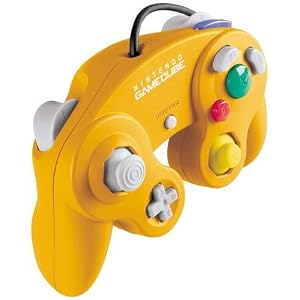
And would be nice that P3D also support controllers without analogs.
most other controllers need to download other support for them
When I use my PS4 controller I have to run a program that interprates the button presses and converts them to the xbox buttons
basically the game still thinks it is an xbox controller even when it isnt
I am sure those controllers have something similar and have some way to change what buttons do what so you will need to use that
again this isnt something we can really fix....it is a windows limitation made by microsoft

SViper
Active Member
So how I can use my controller?Well that is a bit hard to do....for the xbox controllers microsoft include the stuff to run them in windows(since you know microsoft make xbox) and thus we can detect them and get input from them
most other controllers need to download other support for them
When I use my PS4 controller I have to run a program that interprates the button presses and converts them to the xbox buttons
basically the game still thinks it is an xbox controller even when it isnt
I am sure those controllers have something similar and have some way to change what buttons do what so you will need to use that
again this isnt something we can really fix....it is a windows limitation made by microsoft
the same way you would use it for any other gameSo how I can use my controller?
the details for it differ based on controller so just google it

The game uses Direct Input as the input mapping API, a standard Windows library which is part of DirectX.
This only supports XBOX Controllers.
To use other controllers, there is a pretty simple workaround: A program catches any controller input from for example a PS3 controller, and maps these inputs to a XBOX scheme, and then gives these to the Direct Input API, which then sends the converted signals to the game, which in conclusion thinks that an XBOX controller has been used.
You just need to find a program on the internet that allows you to map your 3rd party controllers to Direct Input.
This only supports XBOX Controllers.
To use other controllers, there is a pretty simple workaround: A program catches any controller input from for example a PS3 controller, and maps these inputs to a XBOX scheme, and then gives these to the Direct Input API, which then sends the converted signals to the game, which in conclusion thinks that an XBOX controller has been used.
You just need to find a program on the internet that allows you to map your 3rd party controllers to Direct Input.

if your still not happy, use a program called "GlovePie" its a program that sets keyboard controls to the controller.
I use it for my Gamepad and works fine.
I use it for my Gamepad and works fine.
SViper
Active Member
Thanksif your still not happy, use a program called "GlovePie" its a program that sets keyboard controls to the controller.
I use it for my Gamepad and works fine.
Same idea really, just this maps the button inputs to the keyboard.if your still not happy, use a program called "GlovePie" its a program that sets keyboard controls to the controller.
I use it for my Gamepad and works fine.
The problem with that is that key states are booleanic, so either pressed or not pressed. That doesn't translate very well when you use a thumbstick on your controller, which basically has infinite states in infinite directions.
So I'd recommend a Direct Input mapper.