
Info:
This tool checks if the save files is corrupted or has problems in it. If the file has NUL in it will can cause the crash "StartIndex cannot be less than zero."
Install:
If you need to check if your save is corrupted or has errors do this:
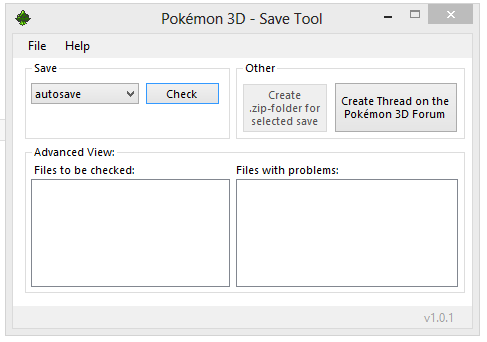

This tool checks if the save files is corrupted or has problems in it. If the file has NUL in it will can cause the crash "StartIndex cannot be less than zero."
Install:
- Download the .zip file
- Export the .exe file
- Move the .exe file to the same folder as Pokémon 3D launcher
- Run the Pokémon3D_SaveTool.exe file
If you need to check if your save is corrupted or has errors do this:
- Run the Pokémon3D_SaveTool.exe file
- Choose a save from the dropdown list
- Click the "Check"-button
- See the result in the list box down to the right
- Run the Pokémon3D_SaveTool.exe file
- Choose a save from the dropdown list
- Click the "Check"-button
- Click the "Create .zip-folder for selected save"-button
- Run the Pokémon3D_SaveTool.exe file
- Choose a save from the dropdown list
- Click the "Check"-button
- Click the "Create .zip-folder for selected save"-button
- Click the "Create Thread on the Pokémon 3D Forum"-button
- Type in the info about the problem.
- Upload your the zip file to the thread and click "Create Thread"
