• ✨ ARCHIVE MODE ✨
    The forum has now been set to read-only mode, no new posts, resources, replies etc will not be possible.
    We recommend you join our Discord server to get real-time response: Discord Invite Link

Just for now.. about graphics configuration.

Lunedi

Pokémon Ranger
Is this the best settings for "Low PCs"?
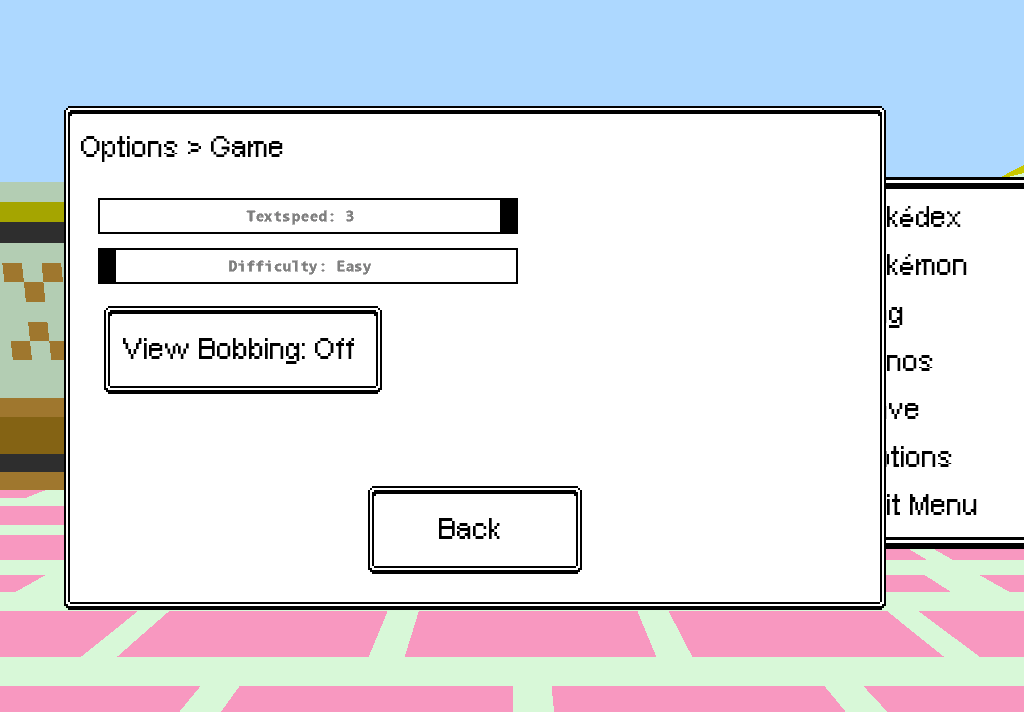


Because i have:
AMD Athlon 64 X2 Dual Core 5200+
2,6 GHz in RAM 2 GB
Video NVIDIA GeForce 9600 GT 1 GB
Windows XP SP3 x86

And in Olivine's Lighthouse i got only 9-10 FPS..
And in so many cities like violet, goldenrod, olivine also, the fps are like between 30-40
Cant the devs add more options like vsync or a fps limiter to none? ... i mean, for people who want to play the game at good speed :/ ...
Look at minecraft, Minecraft have also the vsync config and the 1.7 has added the Max FPS option..


Cya~
 

Tornado9797

Content Developer
P3D Developer
Global Moderator
Probably, maybe FOV could be brought a little lower?
Also play in a windowed screen and with the light engine, GUI, and debug menus all off (F4, F1 and F3 respectively).
 

Lunedi

Pokémon Ranger
Probably, maybe FOV could be brought a little lower?
Also play in a windowed screen and with the light engine, GUI, and debug menus all off (F4, F1 and F3 respectively).
I usually play in windowed, i dont now what is the light engine, and i only use debug menus when i need it, i usually keep them hidden.


Cya~
 

Tornado9797

Content Developer
P3D Developer
Global Moderator
Probably, maybe FOV could be brought a little lower?
Also play in a windowed screen and with the light engine, GUI, and debug menus all off (F4, F1 and F3 respectively).
I usually play in windowed, i dont now what is the light engine, and i only use debug menus when i need it, i usually keep them hidden.


Cya~
The light engine toggler was added in a long time ago to experiment with a new lighting system, I find it slightly less laggy when it is disabled (though it's really difficult to tell if it's on or off).
 

Lunedi

Pokémon Ranger
I usually play in windowed, i dont now what is the light engine, and i only use debug menus when i need it, i usually keep them hidden.


Cya~
The light engine toggler was added in a long time ago to experiment with a new lighting system, I find it slightly less laggy when it is disabled (though it's really difficult to tell if it's on or off).
But how can i disable that light engine?
I mean.. where it appears?
 

Leahkim

Dragon Tamer
I run Pokemon 3D at maximum settings and I have a Intel i5 1.8GHz processor and 8GB RAM.
The game isn't really that taxing on the PC so it could be something else interfering with your gameplay. Check your RAM usage
 

Lunedi

Pokémon Ranger
I run Pokemon 3D at maximum settings and I have a Intel i5 1.8GHz processor and 8GB RAM.
The game isn't really that taxing on the PC so it could be something else interfering with your gameplay. Check your RAM usage
400 MB with only P3D Oppened, without Chrome or Skype, and it doesnt make any difference too..
 

Leahkim

Dragon Tamer
400 MB with only P3D Oppened, without Chrome or Skype, and it doesnt make any difference too..
Hm. I typically run Dropbox, Skype, P3D, Chrome, and a few other minor programs simultaneously.
I'd check to make sure all your drivers are up to date, specifically your graphics driver.
Also, has it always been like this or it a more recent occurence?
 

Lunedi

Pokémon Ranger
400 MB with only P3D Oppened, without Chrome or Skype, and it doesnt make any difference too..
Hm. I typically run Dropbox, Skype, P3D, Chrome, and a few other minor programs simultaneously.
I'd check to make sure all your drivers are up to date, specifically your graphics driver.
Also, has it always been like this or it a more recent occurence?
Yes, i've updated like 1 or 2 days ago my video driver..
And i've started to played like 5 or 6 days ago, i've got 19-20 hs played, so.. i know that from the beggining P3D runs me like this.. when i've had to go to olivine's lighthouse that was really annoying..
 

Darkfire

Administrator
Administrator
P3D Developer
Hm. I typically run Dropbox, Skype, P3D, Chrome, and a few other minor programs simultaneously.
I'd check to make sure all your drivers are up to date, specifically your graphics driver.
Also, has it always been like this or it a more recent occurence?
Yes, i've updated like 1 or 2 days ago my video driver..
And i've started to played like 5 or 6 days ago, i've got 19-20 hs played, so.. i know that from the beggining P3D runs me like this.. when i've had to go to olivine's lighthouse that was really annoying..
My FPS sucks as well
My Build of it is a bit more system intensive and I often am running the lighthouse and large outside maps at 0 FPS(which means less than 0.5 fps)
 

Lunedi

Pokémon Ranger
Fixed:
Im testing a Windows 8 Lite Version and now P3D runs at 60 FPS in so much places (Goldenrod and Olivine's Lighthouse still have FPS Drop, but i can deal with it, i mean.. in W8 is a FPS Drop from 60 to 40, not like in XP where it is like 60 to 9-10 ._.)
 
Top